
 Add as preferred on Google
The Best LLMs in 2026: A Comparison and What to Expect in 2027Read More
Amazon Web Services (AWS) data leaders rarely compare Databricks and Amazon Redshift because they want another feature checklist. The comparison usually appears when the data operating model changes: business intelligence (BI) teams still need reliable Structured Query Language (SQL) analytics, while data engineering, artificial intelligence (AI), and machine learning (ML) teams need broader access to raw, semi-structured, streaming, or model-ready data.
That is why this decision is less about lakehouse versus warehouse as a slogan and more about workload fit. Redshift often has organizational gravity in AWS environments because teams already use services such as Amazon Simple Storage Service (S3), AWS Glue, AWS Identity and Access Management (IAM), Amazon Virtual Private Cloud (VPC), Lake Formation, and BI tools connected to existing Redshift workloads. Databricks enters the conversation when teams need a unified environment for data engineering, Spark and Python pipelines, data science, ML, streaming, and governed data sharing on open storage.
Implementation risk belongs in the decision from the start. Moving or splitting workloads can involve SQL translation, extract, transform, load (ETL) and extract, load, transform (ELT) rewrites, BI connector validation, identity mapping, governance redesign, and cost model changes.
Databricks is a cloud-native data intelligence platform built around lakehouse architecture. In AWS deployments, data can live in open table formats such as Delta Lake and, where supported, Apache Iceberg on S3, while compute is applied through Databricks clusters, SQL warehouses, notebooks, workflows, and ML tooling.
Amazon Redshift is a cloud data warehouse designed for managed SQL analytics at scale. It supports provisioned and serverless deployment models, connects deeply with AWS services, and is commonly used for BI reporting, ad hoc analysis, and structured analytics workloads.
The practical difference is not that one platform runs SQL and the other does not. Both can support SQL analytics. The difference is how each platform organizes storage, compute, governance, workload orchestration, performance tuning, and team ownership.
The highest-impact differences are architectural and operational. Databricks centers on lakehouse architecture over object storage, with common fit for engineering, AI, ML, streaming, and mixed data. Redshift centers on warehouse architecture for SQL analytics, with common fit for BI, reporting, structured analytics, and AWS-native warehouse operations. Databricks governance centers on Unity Catalog and lakehouse assets, while Redshift governance often sits inside the broader AWS control plane through Redshift permissions, Lake Formation, and related AWS services.
Treat those differences as a starting point. The right answer depends on which workloads dominate and which operating model your teams can sustain.
Lakehouse architecture is designed to combine data lake flexibility with warehouse-style management. In Databricks, that means teams can work with data on cloud object storage, use open formats, and apply compute for engineering, SQL analytics, ML, and streaming workflows.
Redshift starts from the opposite center of gravity: a managed warehouse engine optimized for SQL query processing. Its architecture is well aligned to known schemas, structured analytics, BI serving, workload management, and established warehouse administration patterns. Redshift Spectrum and newer warehouse-and-lake capabilities extend access to S3 data, but the platform's core identity remains warehouse-centered.
This distinction matters when data formats and workloads diversify. If your platform must support Python and Spark pipelines, feature engineering, model training, streaming transformations, and SQL analytics in one governed environment, Databricks may reduce pipeline fragmentation. If your main requirement is dependable SQL serving for reporting teams inside AWS, Redshift may be the more direct fit.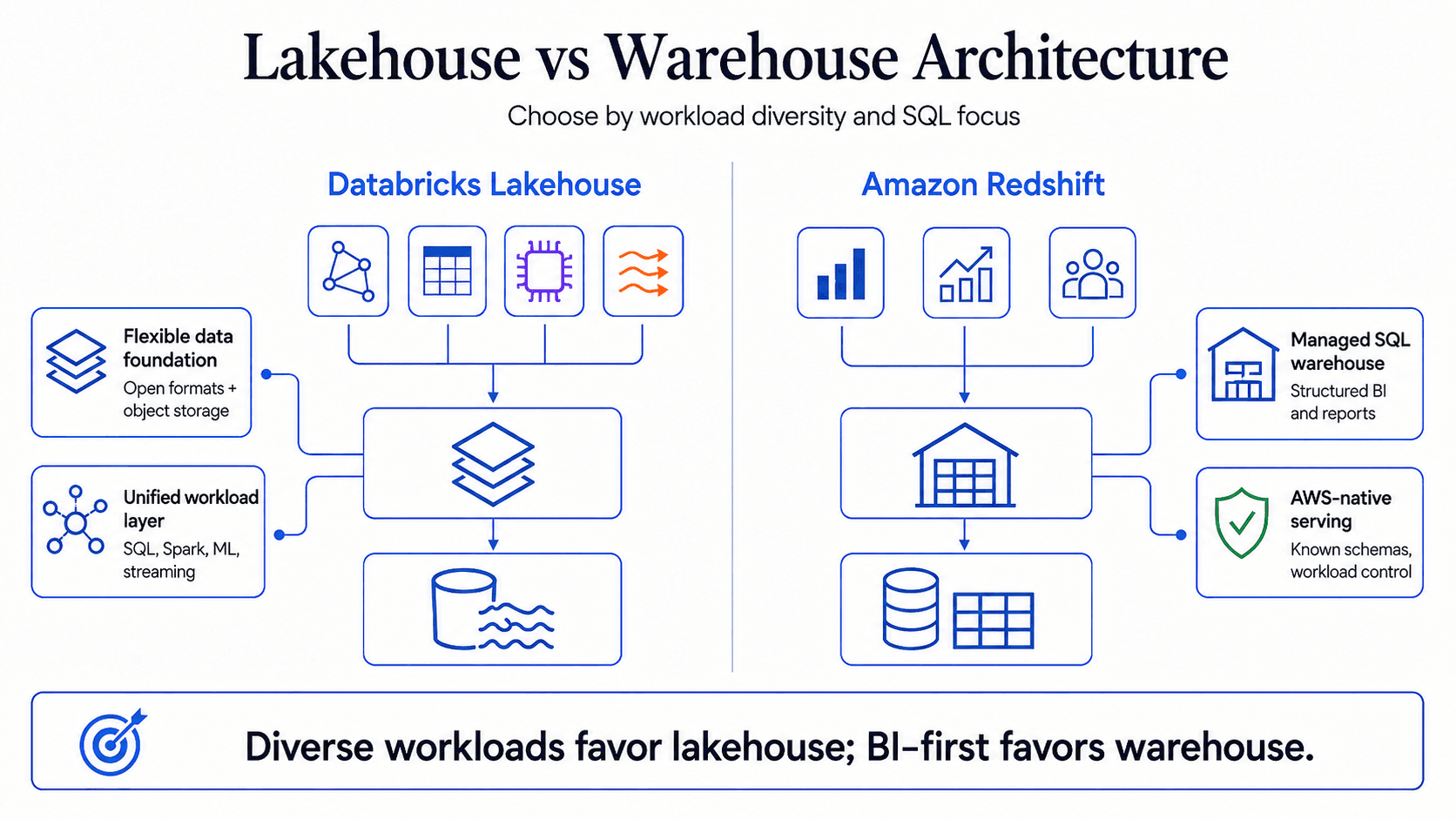
Workload fit should drive the comparison. Databricks is strongest when analytics, engineering, and ML workflows are connected. The research report identifies use cases such as large-scale ETL and ELT, Python and Spark transformation, data science, MLflow-based model lifecycle work, streaming, near real-time processing, generative AI workflows, and multi-format data sharing.
Redshift is strongest when the workload is warehouse-centered: structured SQL, BI dashboards, ad hoc reporting, and analytics teams already operating in AWS. It also fits organizations that want to extend an existing Redshift estate through serverless options, reservation models, lake access, or newer Redshift instance types rather than re-platforming.
Mixed workloads need testing. A reporting layer fed by complex Python transformations may benefit from both platforms. A BI-heavy environment with limited ML needs may not justify a Databricks rollout. Inventory workloads by data volume, latency, concurrency, data format, transformation complexity, governance sensitivity, and team skills before making the call.
Governance is an operating discipline. Databricks governance centers on Unity Catalog, including catalog-level control, data access policies, lineage capabilities, and governance across lakehouse assets. This can help when the organization needs a governed environment for engineering, analytics, AI, and ML assets.
Redshift governance is tied closely to AWS security and data governance patterns. The report references Redshift access controls, row-level and column-level controls, Redshift Spectrum with Lake Formation, AWS Lake Formation managed datashares, and Federated Permissions for multi-warehouse governance. For AWS-first teams, that ecosystem alignment can simplify ownership.
Hybrid architecture can make governance harder. If the same data exists in Delta Lake and Redshift-managed storage, policies, lineage, audit logs, and access models can drift. Ask for architecture diagrams, identity mappings, role-based access control examples, lineage coverage, audit log samples, and data sharing patterns before deciding that hybrid is safer.
Pricing models are not directly comparable without workload context. Databricks consumption is shaped by Databricks Unit usage, cluster configuration, SQL warehouse settings, runtime choices, workload isolation, and engineering practices. Redshift cost depends on provisioned or serverless deployment, node or Redshift Processing Unit usage, reservations, storage, concurrency, and tuning needs.
Performance claims also need caution. The report includes vendor-reported improvements for Databricks SQL and AWS claims for newer Redshift RG instances, but neither should be transferred to your environment without testing. Query patterns, data layout, file formats, concurrency, sort and distribution design, partitioning, and workload management all affect results.
A credible total cost of ownership (TCO) model should include engineering time. Cost is not just compute and storage. It also includes warehouse tuning, cluster optimization, governance configuration, pipeline rewrites, migration work, FinOps controls, and support from an implementation partner if internal skills are thin.
The cleanest answer is contextual. Choose based on your dominant workloads, governance model, team capabilities, AWS commitments, and tolerance for migration or coexistence complexity. Broader warehouse comparisons can help if Snowflake is also in scope, but keep this decision focused on the Databricks and Redshift trade-off.
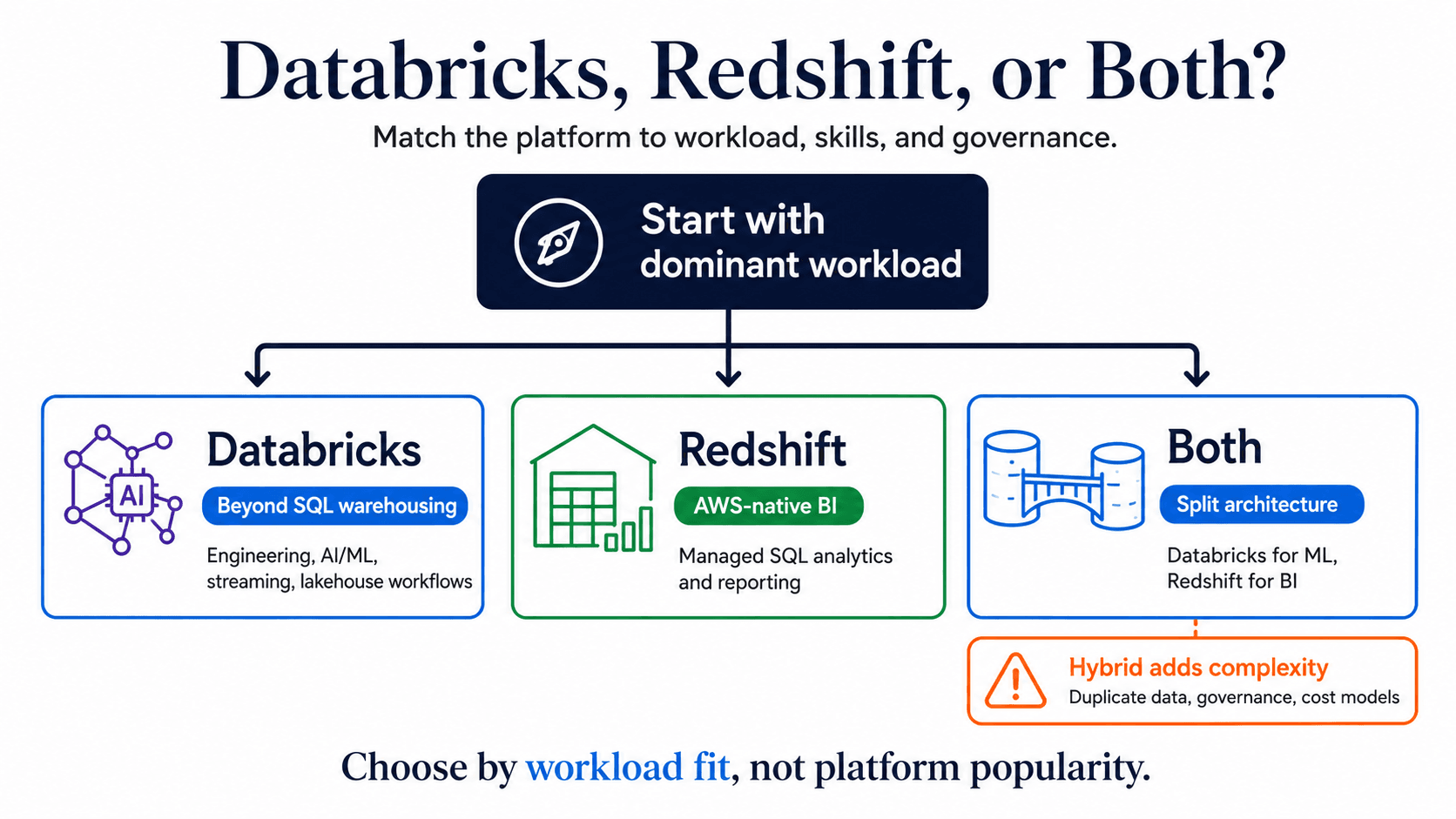
Choose Databricks when the platform strategy includes more than structured SQL analytics. It is a strong candidate for enterprises that need data engineering at scale, Python and Spark workflows, AI and ML model development, streaming, feature engineering, governed data sharing, or generative AI use cases tied closely to enterprise data.
The counterpoint is operational maturity. Databricks can demand skills that SQL-only teams may not have. Cluster configuration, autoscaling, workload isolation, and consumption monitoring need active ownership. A Databricks proof of concept should test real pipelines, representative data volumes, Unity Catalog governance, cost attribution, and developer experience.
Choose Redshift when the enterprise is deeply AWS-native and the central requirement is managed SQL analytics. It fits organizations with established Redshift workloads, BI teams, AWS Glue pipelines, Lake Formation governance, QuickSight or Tableau reporting, and teams already fluent in SQL warehouse practices.
The counterpoint is workload breadth. Redshift ML through SageMaker can support some in-warehouse ML activity, and Redshift lake access has improved, but Redshift is not a full substitute for Databricks' end-to-end MLflow, model serving, Spark engineering, and lakehouse workflow capabilities. Validate peak BI concurrency, workload management, lake query performance, and governance coverage before expanding Redshift by default.
Using both platforms can be rational. Databricks may own data engineering, ML, and streaming workloads while Redshift continues serving BI and structured reporting. This can reduce migration risk and let teams operate in tools that match their skills.
But hybrid is not neutral. It can introduce duplicated data, inconsistent governance, more integration work, two cost models, and two operating skill sets. Define workload boundaries before accepting hybrid as the answer: which datasets are mastered where, how data moves, who owns access control, and how cost is attributed across platforms.
Vendor demos and benchmark claims are useful inputs, but they are not enough for an enterprise platform decision. Your evaluation should separate workload fit, governance, cost, performance, skills, and implementation readiness.
Build a workload inventory before choosing a platform. Include BI dashboards, ad hoc SQL, batch ETL and ELT, streaming pipelines, data science, ML training, near real-time analytics, and AI workflows.
For each workload, record data volume, growth rate, latency target, concurrency requirement, data format, transformation complexity, governance sensitivity, and team proficiency in SQL, Python, and Spark. This will show whether the center of gravity is warehouse-optimized, lakehouse-native, or legitimately split.
Do not let one strong benchmark or one attractive cost estimate decide the platform. Score governance, cost, performance, and team readiness as separate dimensions because any one of them can become the failure point.
For governance, test identity integration, access controls, audit logs, lineage, and data sharing. For cost, model actual query counts, pipeline runtimes, data scan rates, and engineering effort. For performance, test representative workloads at peak concurrency and meaningful data volume. For team readiness, identify whether the team can operate Spark, Python, SQL warehousing, FinOps controls, and governance configuration without constant external help.
A proof of concept should test the operating model. Include production-like data formats, representative workload volume, governance mapped to real identity requirements, and cost instrumentation for the relevant consumption model.
Define success criteria before the test starts. Measure performance, cost, governance coverage, migration effort, developer experience, and operational support burden. If the result is mixed, treat that as useful evidence. It may point to phased migration, workload-specific adoption, or a controlled hybrid model instead of a single-platform answer.
The lakehouse versus warehouse debate is settled only when it is tied to your operating model.
Choose Databricks when your data platform must unify engineering, AI, ML, streaming, open data formats, and governed access across diverse workloads. Choose Redshift when the main requirement is AWS-native SQL warehousing, BI serving, and structured analytics supported by established warehouse teams. Use both only when workload boundaries are clear enough to justify the extra governance, integration, and cost management overhead.
The next step is practical: create a workload inventory, document governance requirements, model TCO with real usage assumptions, and run a proof of concept against the two or three highest-stakes workloads.
...Loading Related Blogs
Trusted by top platforms for our transformative solutions and exceptional results: