

 Add as preferred on Google
Odoo Modules Explained: Which Odoo Apps Your Business Actually NeedsRead More
App development cost in 2026 can range from under $15,000 for a bare-minimum prototype to more than $500,000 for an enterprise-grade platform. A mid-complexity, full-cycle project may land near $170,000, but that number only becomes useful when you understand what is included.
The real question is not just “how much does it cost to make an app?” It is what scope, team, platform, quality level, and post-launch plan you are budgeting for. For the broader build journey, see this complete guide on how to make an app.
An app estimate is not a fixed commitment unless the scope is defined in detail. Early numbers are rough order-of-magnitude estimates, and software estimation research shows that early requirements can carry wide uncertainty.
Two projects can both be “apps” while requiring completely different budgets. A simple appointment scheduler, a two-sided marketplace, and a regulated finance or health app have different backend, security, testing, and support needs.
Before asking for quotes, prepare an outcome statement, user roles, must-have workflows, platform preferences, compliance constraints, integration needs, and timeline expectations. Better inputs produce better estimates.
The biggest cost drivers are scope, platform, backend complexity, design depth, testing effort, team seniority, and region. Hourly rates matter, but they are not the whole budget.
A lower rate can still create a higher total cost if the team needs more supervision, creates rework, or omits key delivery work.
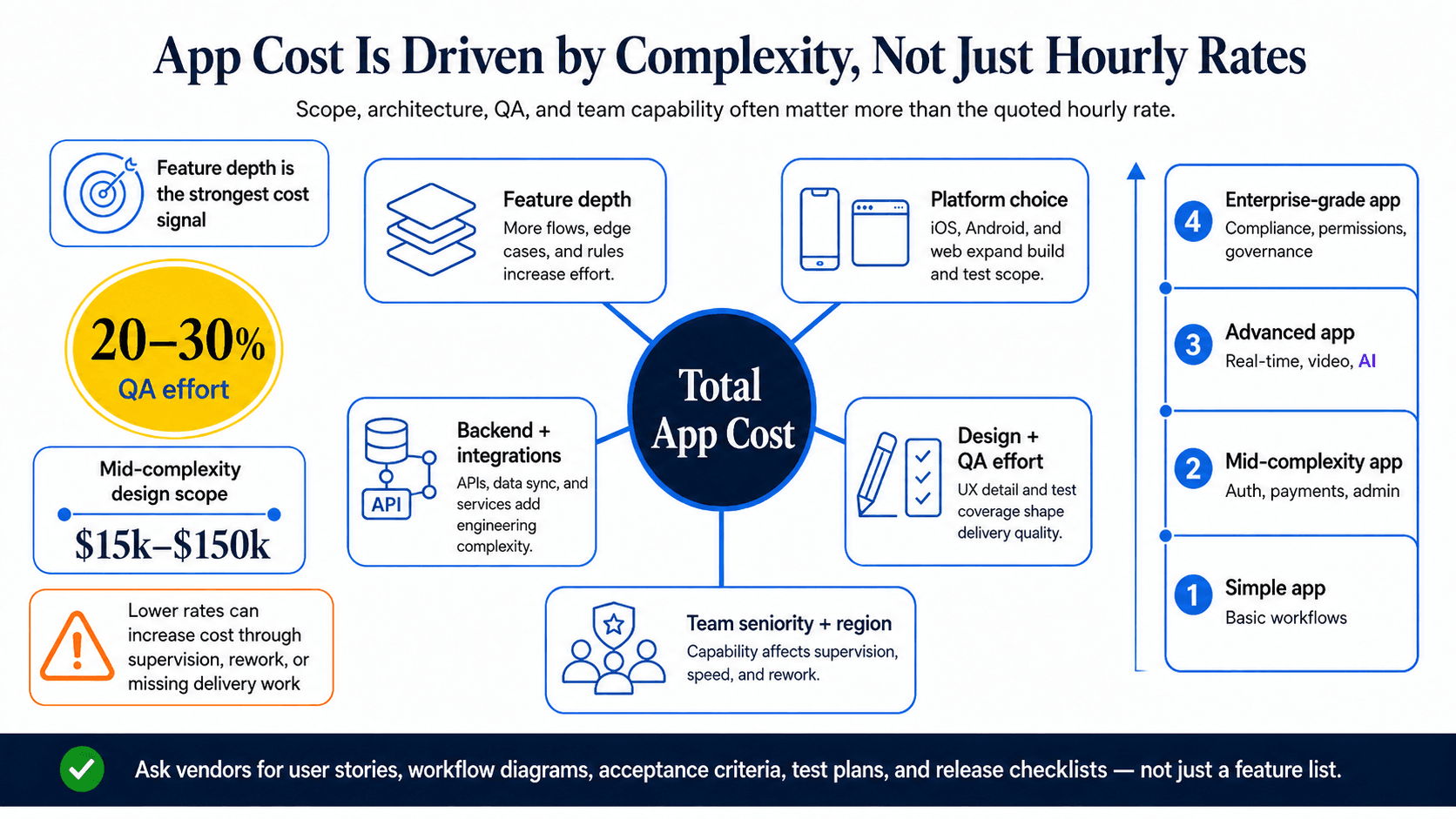
Feature depth is the strongest cost signal. Complexity depends on user roles, workflows, screens, admin panels, permissions, business logic, and integrations.
| Complexity tier | Typical profile | Cost implication |
| Simple app | Limited screens, basic backend, simple workflows | Lower effort and fewer dependencies |
| Mid-complexity app | Authentication, payments, notifications, sync, admin tools | More design, backend, and testing work |
| Advanced app | Real-time features, location, video, marketplace flows, AI recommendations | Deeper architecture and broader QA |
| Enterprise-grade app | Multi-tenant data, audit trails, complex permissions, compliance needs | Higher security, governance, and support effort |
A feature that sounds simple can hide substantial work. “Users can message each other” may include authentication, real-time delivery, media handling, push notifications, moderation, and accessibility.
Ask vendors for user stories, workflow diagrams, and acceptance criteria, not just a feature list.
A native app is built separately for Apple mobile operating system (iOS) or Android. Native development gives strong platform integration and performance, but building both platforms can require separate codebases and testing cycles.
A cross-platform app uses a shared codebase for multiple platforms. Frameworks such as Flutter and React Native can reduce duplicate work, but they may introduce limits for apps with heavy device hardware use, advanced performance needs, or highly platform-specific experiences.
A web app or progressive web app can reduce app store overhead, but may not provide the same device access, offline behavior, or notification capabilities as a mobile app. Verify platform support, device coverage, release requirements, and app store work before approving the estimate.
The backend includes databases, application programming interfaces (APIs), authentication, payments, notifications, cloud hosting, analytics, and admin tools. It is often where early app estimates are most incomplete.
Managed backend services can lower initial effort, but may create limits around customization, portability, and usage-based costs. Custom backend infrastructure gives more control but requires more architecture, DevOps, monitoring, and maintenance.
Security can also change the budget. Apps handling payments, personal data, health data, or financial information may need stronger authentication, encryption, penetration testing, monitoring, and qualified compliance review.
Coding is only part of app development cost. User experience (UX) design, user interface (UI) design, product management, documentation, quality assurance (QA), release planning, and stakeholder communication all require time.
QA can represent 20 to 30 percent of total mobile application development effort. Design for a mid-complexity app may range from $15,000 to $150,000 depending on scope, location, and engagement model.
A credible proposal should include wireframes or prototypes, a test plan, acceptance criteria, sprint or milestone planning, and a release checklist.
Region affects rates. US effective engineering rates are around $80 to $150 per hour, India around $18 to $40, Vietnam around $20 to $50, the Philippines around $15 to $75, Latin America around $35 to $80, and senior Eastern or Central European developers around €65 to €105.
Those ranges do not mean the lowest rate is the lowest project cost. Senior developers may solve architectural problems earlier, need less supervision, and reduce rework.
A complete team may include a product manager, business analyst, UX/UI designer, frontend developer, backend developer, QA engineer, DevOps specialist, and security specialist.
Pricing models decide who carries risk and how much flexibility the project has. The right model depends on scope certainty, buyer involvement, and internal product maturity.
| Model | Best fit | Main risk |
| Fixed price | Stable, documented scope | Change requests and hidden assumptions |
| Time and materials | Evolving product scope | Requires active budget governance |
| Dedicated team | Long-term product development | Needs internal product leadership |
| Staff augmentation | Filling specific skill gaps | Buyer owns delivery management |
| No-code or low-code | Prototypes and simple workflows | Platform limits and lifecycle cost |
Fixed price works when requirements, wireframes, user stories, and acceptance criteria are already clear. It can help with budget predictability, but only if the scope is truly stable.
If the proposal says “user authentication” without defining social login, password reset, multi-factor authentication, session length, and account lockout behavior, the fixed price is built on ambiguity.
Time and materials charges for actual work performed. It fits discovery-heavy or evolving projects where priorities may change.
The trade-off is governance. Buyers need sprint budgets, weekly burn-rate reporting, backlog prioritization, approval thresholds, and the ability to pause or redirect work at sprint boundaries.
A dedicated team provides ongoing engineering capacity. Staff augmentation adds individual specialists to your existing team.
Both models work best when you already have product leadership, technical direction, and delivery oversight. Without that internal maturity, you may gain capacity but lose control over outcomes.
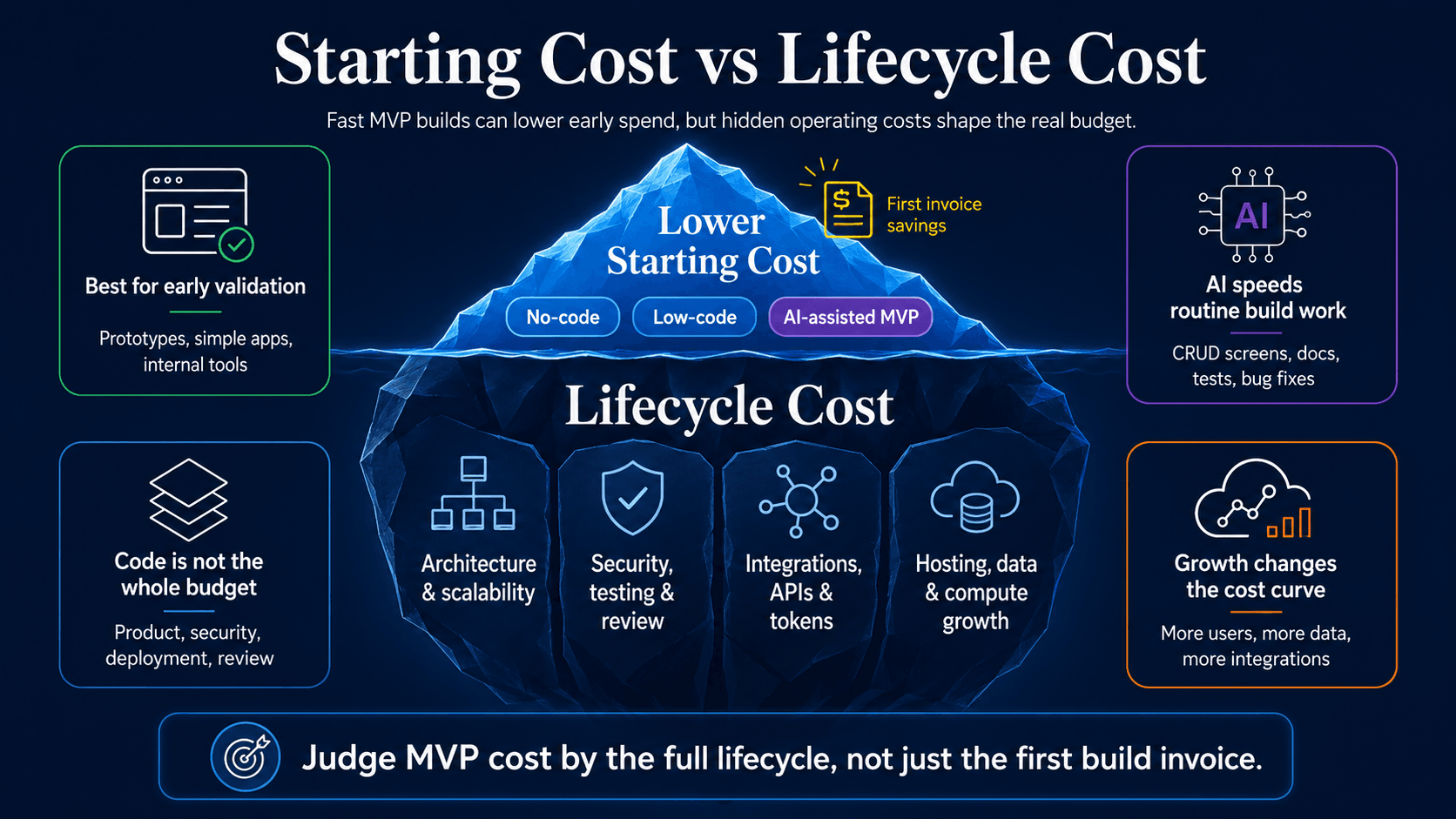
No-code and low-code platforms can lower the first invoice for prototypes, internal workflow tools, and simple applications. They are often a sensible way to test whether anyone wants the product before funding a custom build. An MVP, though, should prove the core value proposition. Treating it as a stripped-down version of the final app usually leads to weak product signals and messy rebuild decisions later.
AI coding tools are changing the early budget conversation as well. Tools such as Claude Code, OpenAI Codex, and Google Antigravity can help teams generate code, modify existing codebases, fix routine bugs, automate development tasks, and move through MVP implementation faster. Claude Code, for example, is positioned as an agentic coding tool that can work across a codebase, edit files, run commands, and integrate with development tools. (Claude API Docs) Google describes Antigravity as an agent-first development platform where agents can plan, code, validate, and iterate. OpenAI’s Codex pricing model includes usage limits, credits, and token-based consumption for some plans.
For small to medium-size apps with familiar workflows, modest traffic, limited compliance requirements, and lightweight functionality, AI-assisted development can be a practical way to reduce early build cost. The savings are most likely to show up in scaffolding, CRUD screens, admin panels, API integrations, documentation, test generation, and routine bug fixing. That is real leverage, especially when the product scope is narrow and the team already knows what needs to be built.
The risk is assuming that faster code generation removes the work around the code. Product decisions still need to be made. Architecture still needs to hold up under future use. Security, testing, deployment planning, and human code review still sit on the budget, even when AI handles part of the implementation.
Lifecycle cost also depends on the pieces around the application: third-party integrations, API usage, model tokens, cloud hosting, database growth, storage, bandwidth, background jobs, authentication, payments, notifications, analytics, and compute-heavy features such as video, real-time collaboration, recommendations, or AI inference. A quote that ignores those items may look competitive at the start and become expensive once the app has real users.
The more useful budget question is not just, “Can this be built quickly?” A founder or product leader also has to ask whether the platform, codebase, data model, and infrastructure will still work when usage grows, integrations multiply, security expectations rise, or the product becomes harder to change. Tool-based and AI-assisted builds can absolutely lower starting cost, especially for MVPs. They still need to be judged against lifecycle cost before being treated as the cheapest long-term path.
A realistic app budget starts with business goals, then turns those goals into scope, team needs, contingency, and lifecycle costs.
This is where a broader business decision framework helps. If you are still deciding whether the app is the right investment, use this guide on how to create an app for your business before turning the idea into a vendor brief.
Start with the result the app must create: revenue, retention, efficiency, self-service, data visibility, or customer engagement.
Then identify every user role. A customer-only app is simpler than an app with customers, admins, moderators, support agents, and partners. Each role creates permissions, workflows, screens, and test cases.
Your launch budget and roadmap budget are different. Phase one should include the smallest set of features needed to validate the product’s core value with real users.
Later-stage features may include analytics, reporting, advanced admin tools, expanded integrations, optimization, and new user workflows. Ask vendors to separate phase one from future roadmap assumptions.
Software projects uncover unknowns. Integrations behave differently than expected, compliance review expands scope, user feedback changes priorities, and performance constraints appear during testing.
A 20 percent contingency above the development estimate is commonly applied in custom software budgeting. Treat that as a separate reserve, not as extra feature budget.
Initial build cost is not total cost of ownership. Post-launch costs include maintenance, hosting, monitoring, support, analytics, security updates, app store updates, and future feature work.
Annual maintenance is at 15 to 25 percent of the initial development investment. Hosting may be minimal for low-usage apps, but can rise sharply for higher-traffic products.
Monetization assumptions also affect budget. If subscriptions, in-app purchases, ads, or marketplace payments matter to the business case, connect those assumptions to your budget model without turning the scope into a full monetization plan. For that deeper topic, see how to make an app that makes money.
Do not compare app quotes by total price alone. Compare them by assumptions, scope, team, timeline, exclusions, and delivery evidence.
A lower quote may simply exclude discovery, design, testing, app store work, security review, or support.
Common exclusions include content migration, app store submission, third-party fees, analytics setup, compliance support, penetration testing, accessibility auditing, training documentation, and post-launch maintenance.
Ask vendors to document buyer responsibilities, third-party account ownership, included team hours, milestone deliverables, testing environments, and handover terms.
Normalize proposals before choosing. Compare the same feature scope, platform coverage, team roles, seniority, timeline, QA plan, support terms, and exclusions.
Ask each vendor for an assumptions log. This shows what must be true for the estimate to hold and exposes gaps between proposals.
Sales claims about agile delivery are not enough. Ask for sample artifacts from prior projects.
Useful proof includes discovery notes, a technical architecture plan, product backlog, sprint plan, acceptance criteria, QA plan, security checklist, release plan, and risk register.
A paid discovery phase, often $5,000 to $15,000, can reduce estimate uncertainty before committing to full development.
A cheap-looking estimate may be incomplete rather than efficient. The main warning signs are vague scope, missing quality work, unclear ownership, and unrealistic delivery promises.
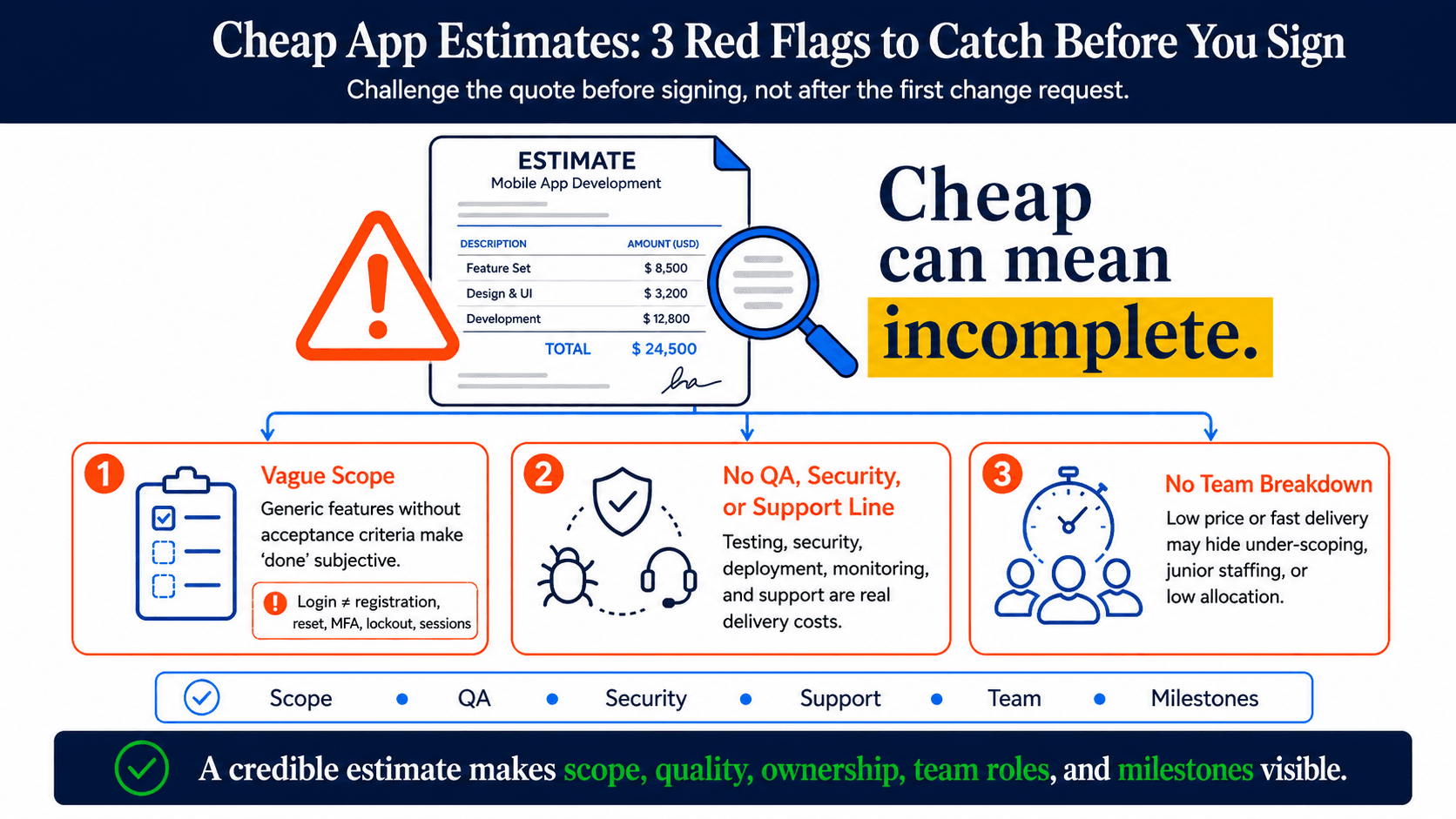
Challenge the quote before signing, not after the first change request.
“Users can log in” is not enough scope detail. A stronger version defines registration methods, password reset, social login, multi-factor authentication, account lockout, and session behavior.
Acceptance criteria define what “done” means. Without them, milestone approval becomes subjective and change control becomes harder.
Testing, security, deployment, monitoring, and support are real work. If they are missing or bundled vaguely, the proposal is not showing the full delivery cost.
Ask who owns QA, what test environments are included, whether security testing is separate, what monitoring is set up at launch, and what support period is included.
A fast timeline and unusually low price can signal under-scoping, junior staffing, or low actual allocation.
Ask for named roles, seniority, allocation by phase, workload availability, and milestones tied to scope. A credible team breakdown should make the delivery plan visible.
A defensible app budget is a documented set of decisions, not a single number. Before contacting vendors, prepare:
Before approving a vendor, confirm that the proposal includes team roles, scope inclusions, exclusions, acceptance criteria, QA, security review, support terms, milestones, change control, and an assumptions log.
The practical goal is not to find an exact cost before scope exists. It is to make the assumptions visible enough that you can compare estimates fairly, defend the budget internally, and reduce surprise costs during delivery. For more pages in this app-building cluster, use the how to make an app hub.
A simple app with one or two user roles, basic features, and no complex backend typically costs $30,000–$80,000. Timeline is usually 2–4 months. The range shifts based on platform choice, design depth, and the region of the development team.
A mid-complexity app with multiple user roles, moderate integrations, and a custom backend typically costs $80,000–$180,000, with a 4–7 month timeline. Clutch's 2026 transaction data puts the verified average project cost at $90,780 across all app types.
The cheapest production-ready approach is a cross-platform build, such as Flutter or React Native, covering both iOS and Android from a single codebase, paired with a managed backend service like Firebase to reduce infrastructure work. No-code tools can produce prototypes for less, but often carry migration costs if the product needs to scale.
A simple app typically takes 2–4 months. A mid-complexity build takes 4–7 months. Complex or regulated apps commonly take 8–12 months. Timeline depends on scope clarity, team size, discovery completeness, and how much feedback-driven change occurs during development.
The most common underestimated costs are: annual maintenance, which is 15–25% of development cost per year; marketing and user acquisition, often 50–100%+ of dev cost in year one for consumer apps; GDPR/CCPA compliance implementation, usually $2,000–$10,000 for first-time setup; app store fees, including Apple at $99/year and Google at $25 one-time; and post-launch security audits, typically $1,000–$10,000 annually.
Trusted by top platforms for our transformative solutions and exceptional results: