
 Add as preferred on Google
Warning Signs a Custom Software Vendor Will Miss Deadline (and What to Do)Read More

Scope creep is not usually a surprise. It is the predictable outcome of unclear baselines, fuzzy definitions of “small change,” and decisions made in side channels that never hit a change log. The good news is that you do not need a heavy bureaucracy to control it. You need a shared vocabulary, a simple workflow, and a few budget guardrails that make trade offs explicit.
Scope creep typically starts before the first formal change request (CR). Common patterns include:
Where budget leaks start is often in “clarifications” that quietly alter behavior. A product owner tweaks acceptance criteria after development begins. A subject matter expert asks for “one more thing” while a developer is already in the code. Teams feel ahead of schedule and say yes without logging the ripple effects.
Early warning signals you can spot quickly:
A practical vendor maturity test: ask to see how they define scope vs change, and what artifacts they maintain to log and assess changes. If they cannot show a consistent mechanism, scope creep is not a risk. It is the default outcome.
Most scope disputes are classification disputes. One side calls it a bug. The other side calls it new scope. Clear definitions make the conversation objective and reduce the “free work” drift that breaks budgets.
Use these criteria to classify requests:
Gray zones usually come from vague requirements. When the baseline is unclear, teams misclassify usability improvements as defects or treat real defects as scope. The remedy is traceability: every request should map back to a baseline artifact such as a requirement, user story, acceptance criteria, or a documented assumption.
CR intake and classification rubric (use this every time)
Classify a request as a scope change if any of the following are true:
Classify a request as refinement if all of the following are true:
Classify a request as a defect if all of the following are true:
A vendor that can walk you through real examples across these buckets tends to have healthier scope control.
A baseline scope is the reference point that makes change control fair. In custom software, it is usually represented by a Statement of Work (SOW), a requirements set or initial product backlog, plus clear exclusions.
Two baseline additions reduce later conflict:
What to insist on at kickoff:
A CR is a governance artifact that proposes a change to baseline scope, schedule, or budget, with impact assessment and approvals.
In agile delivery, backlog items are the units of planned work. Not every backlog change needs a CR. The key distinction is whether the change alters the underlying agreement.
Practical mapping:
Enhancements are usually scope extensions, especially when they add value beyond the baseline. Treat them as CRs unless they are already covered by an agreed change budget envelope.
A CR affects the budget through three channels:
These costs compound when changes are frequent and unmanaged. The finance friendly move is to force visibility: each CR should show cost, timeline, risk, and value in plain language.
Even a small feature change can touch multiple areas:
A simple example is a new field on a form. That single field can require database updates, API changes, validation rules, UI updates, accessibility checks, and additional regression tests. If impact assessments do not enumerate these workstreams, estimates are often understated.
Rework is the multiplier when changes force revisiting completed work: redesign, refactor, retest, and re document.
Coordination overhead is the multiplier from reviews, approvals, meetings, cross team alignment, and release planning.
These multipliers grow with:
A useful question to add to every impact assessment: “How much completed work must be revisited?” That makes the rework multiplier visible.
Scope creep often presents first as schedule volatility: milestones slip, sequencing changes, and teams lose the ability to forecast reliably. Once the timeline extends, costs usually follow: more labor hours, more overhead, and higher exposure to external changes like stakeholder turnover or shifting requirements.
The guardrail is simple: if scope increases, either schedule changes, budget changes, or other scope is swapped out. If none of the three is allowed to move, quality becomes the hidden variable.
Prevention is not about saying no to change. It is about putting changes through a consistent path so trade offs are explicit and budget protected.
Create two lanes based on effort and risk.
Fast lane is for low effort, low risk changes that fit within clear thresholds and do not touch core workflows, integrations, or security.
Slow lane is for anything that could alter scope, milestones, or budget, or that touches critical areas such as roles, permissions, data, integrations, or performance.
Define the lane criteria in writing. If the criteria are fuzzy, teams will route significant changes through the fast lane and you lose control.
Approval thresholds prevent bottlenecks while protecting budget. Keep them tiered and explicit.
Below is an example matrix you can adapt. Use the same thresholds for both the client and vendor sides so the approval path is predictable.
Change size and risk | Typical examples | Required approvals | Notes |
| Fast lane, low risk | copy changes, small UI adjustments, simple config | Product Owner plus Vendor PM | Must stay within defined effort cap |
| Medium impact | new report, non critical workflow change, minor data adjustments | Product Owner plus Budget Owner | Requires impact assessment with schedule effect |
| High impact or high risk | new integration, role and permission changes, major workflow changes | Steering group plus Budget Owner plus Vendor Account Lead | Triggers re baselining if it changes milestones |
Make thresholds measurable where possible: effort cap, schedule shift, and risk triggers. Tie “high impact” to what the business cares about: milestones, compliance risk, and budget variance.
A CR that cannot be evaluated should not be approved. Standardize what “complete” looks like.
CR impact assessment template (minimum fields)
If estimates are single point numbers with no assumptions, confidence is low. Favor ranges and stated unknowns.
Contingency is risk management. To keep it transparent:
Separate “unknowns we expect” from “nice to have scope adds.” If contingency becomes a catch all, it turns into an invisible budget leak.
For a deeper budgeting view and cost drivers, see the related internal guide in the conclusion.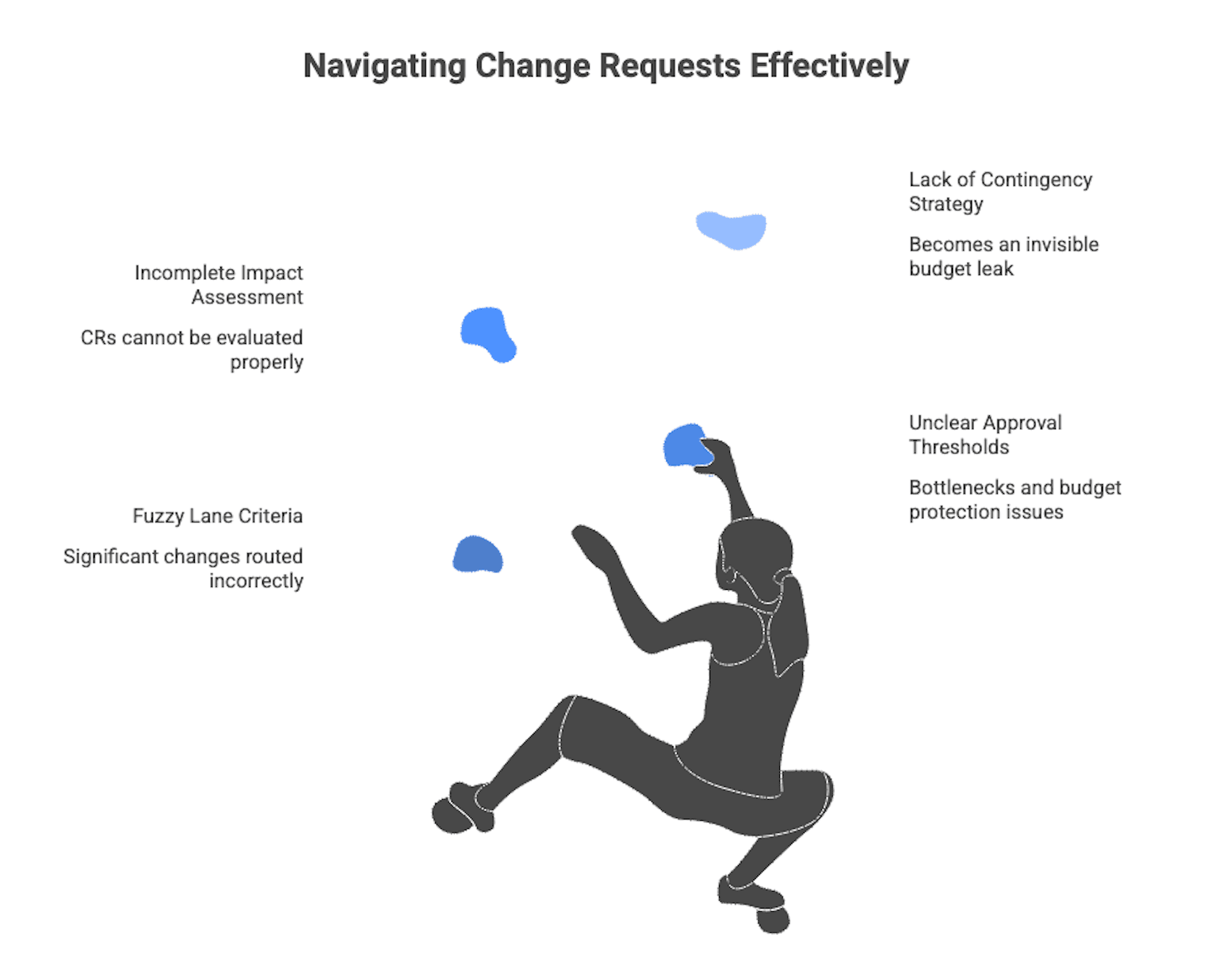
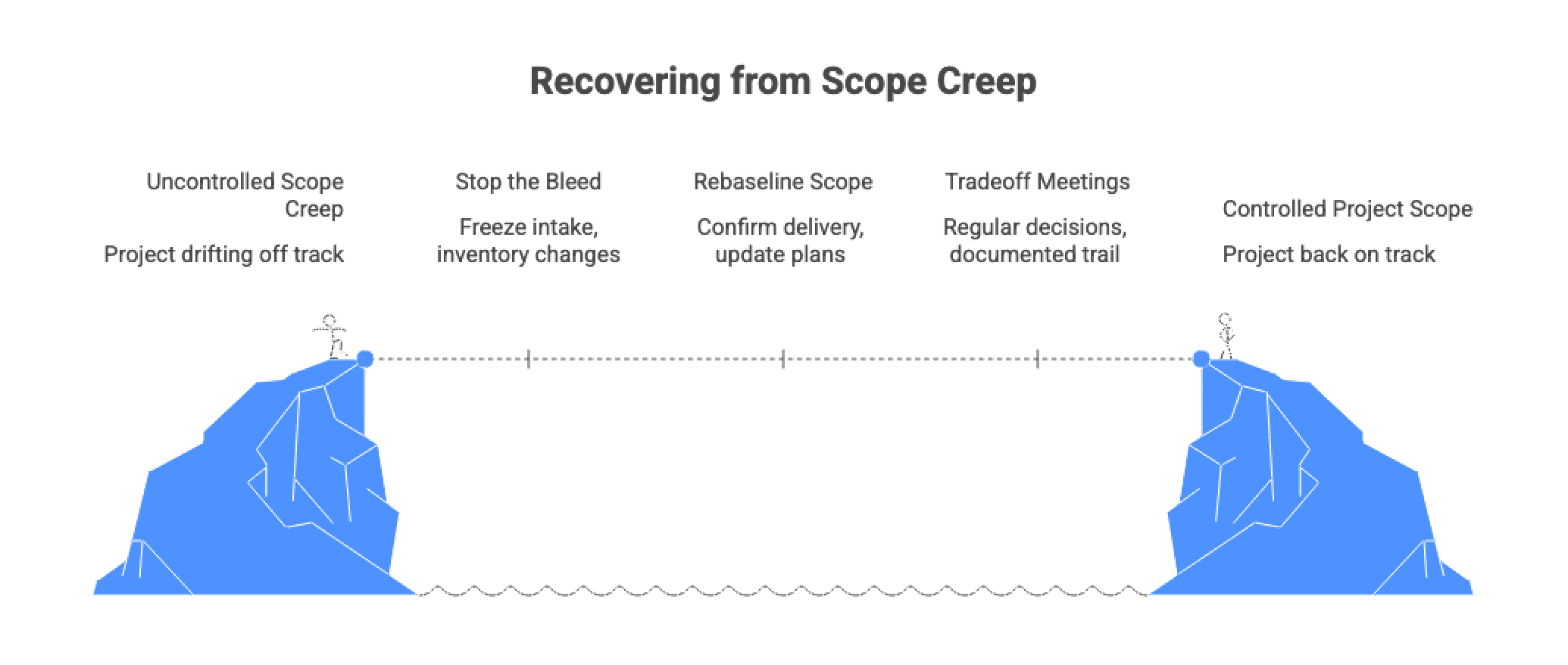
When the project is already drifting, your goal is to regain forecast accuracy without restarting the work.
Temporarily freeze new scope intake while you build a clean inventory. You can continue executing already approved work. The freeze is about stopping new unassessed commitments.
Inventory sources to reconcile:
For each item, capture: description, origin, classification, status, and an initial sizing guess. You are rebuilding traceability so you can re baseline credibly.
Re baselining is appropriate when approved changes make the original plan obsolete. Do not keep reporting against a baseline that no longer reflects reality.
A pragmatic re baseline sequence:
If the vendor resists formal re baselining after significant changes, budget surprises tend to continue.
A regular trade off meeting reduces side channel commitments and speeds decisions.
Agenda that works for finance and delivery:
The key output is a documented decision trail.
A consistent workflow is how scope control becomes real in day to day execution. Use this as the default path for all requests.
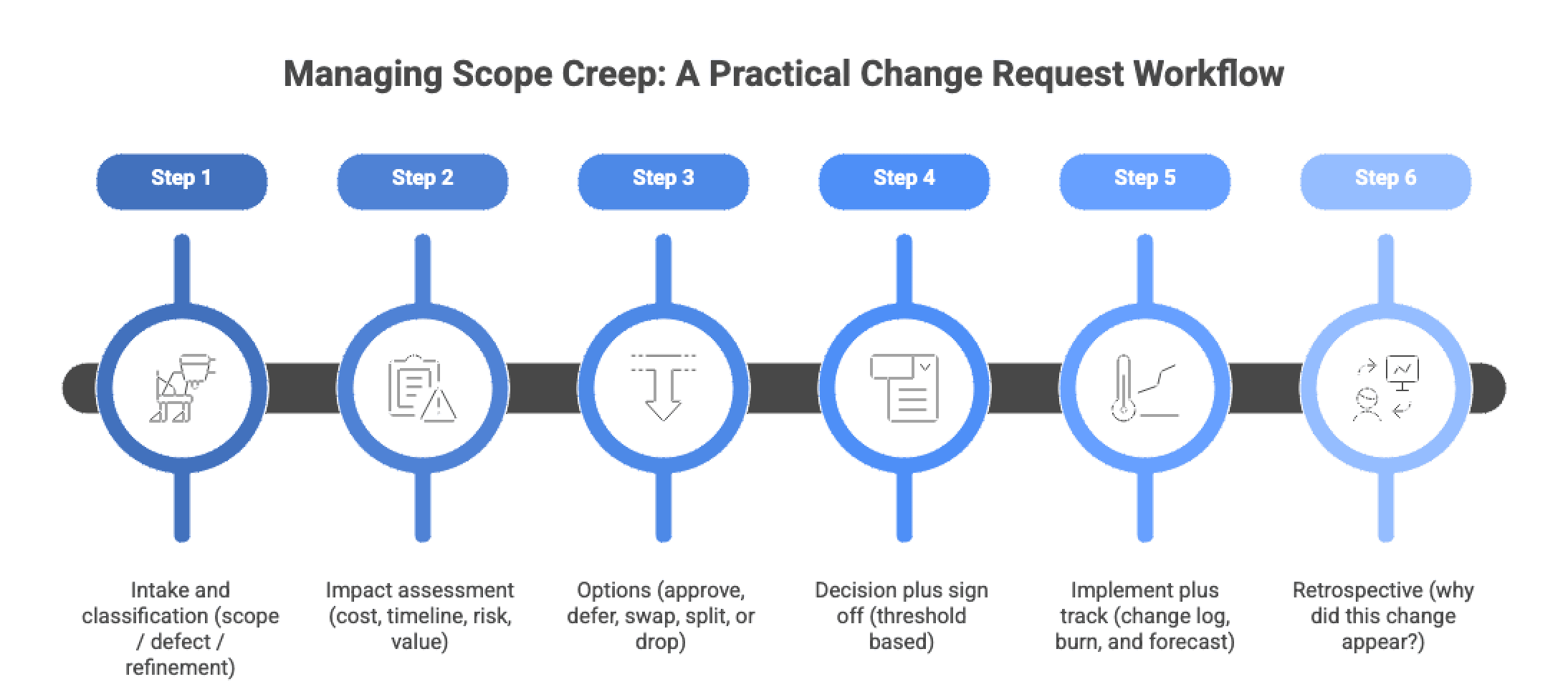
Centralize intake. If changes can be requested in ten places, they will be.
Minimum intake fields:
Enforce a rule: no implementation starts until the request exists in the system and is classified.
Use the impact assessment template and require ranges where uncertainty is real. Include non functional implications and testing and release work.
If a change touches security, permissions, integrations, or data model, it belongs in the slow lane.
Do not let “approve” be the default. For significant changes, require at least two options:
This keeps the budget conversation tied to value.
Tie sign off to the approval thresholds matrix and record:
If it is not signed off, it is not approved.
Your change log is the control tower. Track change volume and spend the same way you track baseline delivery.
Change log minimum fields checklist (track weekly)
If a vendor cannot provide this visibility, you will not be able to manage the budget proactively.
Periodically review change origins and identify preventable drivers:
The goal is reducing repeat causes and improving estimation accuracy over time.
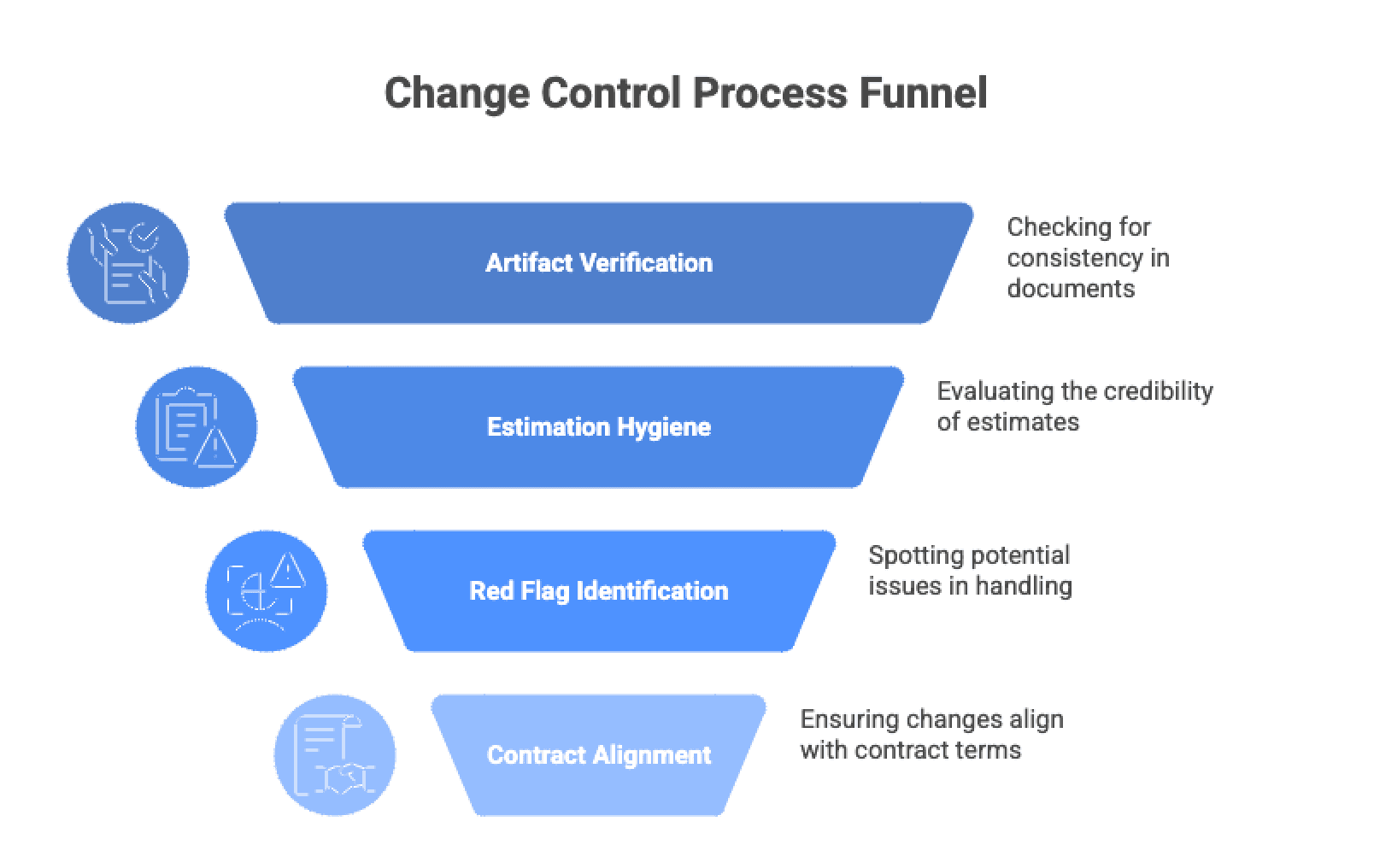
When vendor change control is mature, transparency is routine. Ask for artifacts.
Ask for these, at minimum:
Verification step: check internal consistency. Approved CRs should appear in the backlog and release plan, and forecasts should reflect them.
Credible estimates usually include:
A simple finance friendly test: ask what would change the estimate materially. If the vendor cannot name uncertainty drivers, the estimate is likely not well grounded.
Watch for these patterns:
These patterns often precede schedule slips, quality shortcuts, or delayed budget surprises.
Contracts define the legal mechanism for changing scope and fees, often through CRs or change orders. Your operational workflow should align with that clause so approved changes are enforceable and audit friendly.
Contract model matters:
For clause level depth and governance patterns, use the related contracts and governance guide linked below rather than expanding that content here.
A budget safe posture toward change means change is allowed, but never invisible. You keep agility by routing changes through a light workflow, making cost and schedule impacts explicit, and forcing trade offs when scope grows.
If you implement only one thing, implement the artifacts: baseline scope plus definition of done, a change log, and impact assessments with tiered approvals. Those three tools reduce most avoidable budget surprises.
...Loading Related Blogs
Trusted by top platforms for our transformative solutions and exceptional results: