AI agents can automate order tracking safely when every stated order fact comes from a tool call and rollout passes four gated stages.
Every order fact the agent states must come from a tool call. If no carrier update exists, it escalates to a human instead of guessing.
Launch with order status only. Add returns and cancellations once the pilot meets the team's containment target and shows zero groundedness failures.
When the agent escalates, the helpdesk ticket carries the transcript and API call logs, plus a summary a human can read in 10 seconds.
The architecture has five layers with one job each, so a failure can be traced to the layer that caused it.
Refunds need human approval at first.
Set containment and escalation thresholds from your own baseline before the pilot starts, and keep a documented rollback plan.
"Where is my order?" (WISMO) tickets fill support queues. The answer is already in the order system and the carrier tracking feeds, but agents still look it up by hand while damaged deliveries and other complex cases wait behind them.
Connect an AI agent to your order management system (OMS), carrier tracking and messaging channels. Every order fact it states must come from a tool call, and it hands the customer to a human with full context when it can't help. Rollout has four gated stages, namely foundation, build, pilot and scale. This guide covers the scope, architecture, guardrails, owners and KPIs behind each gate.
Why Order Tracking And Support Automation Matter
Most post-purchase contacts ask where an order is and when it will arrive. Each question is simple. Together they can swamp a support team, but they follow clear, predictable patterns, which makes them a good fit for automation.
When an AI agent is connected to the right systems, customers can check order status, track shipments, get policy answers and start returns or refunds without waiting for a person. AI order tracking pulls verified shipping data from each carrier and gives the same clear update every time a customer asks.
The goal is to automate predictable intents such as order status, cancellations and return eligibility. That leaves human agents free for cases that need judgment. The KPIs later in this guide show whether the goal was met.
Defining Scope and Success Metrics
Start by deciding what the AI agent should handle and how you will measure success. The agent must address intents such as:
Providing accurate current order status and estimated delivery times
Allowing address updates before fulfillment when permitted
Enabling eligible order cancellations
Starting returns or exchanges
Verifying refund eligibility
Explaining relevant policy or product details
To measure effectiveness, use the following key metrics:
Automated containment rate, the share of inquiries resolved without escalation.
First-contact resolution, the share of cases resolved in the first interaction.
Average handle time, how long it takes to resolve a case.
Customer satisfaction (CSAT), based on post-conversation feedback surveys.
Handoff quality, how complete the context is when the agent escalates to a human.
Reference Architecture for an Ecommerce AI Support Agent
This guide uses five layers, each with one job. Because each layer can be built and tested on its own, a failure is easy to trace to the layer that caused it. If you want the theory behind these components, see our breakdown of general AI agent architecture.
Channel ingestion is where customers reach the agent, through web chat, WhatsApp, SMS or voice. Twilio provides APIs for WhatsApp and SMS. For voice, OpenAI's Realtime API with SIP documentation says incoming phone calls can be directed to the API through SIP (as of October 2026).
The agent core is the large language model that reads the customer's request, decides which tool to call and writes the reply. Some teams split the work across several smaller agents, for example one that looks up orders and another that processes returns. According to the microsoft/autogen GitHub README, Microsoft has archived its AutoGen multi-agent framework and names Microsoft Agent Framework as the enterprise-ready successor, so new multi-agent builds should start there.
Enterprise tools connect the agent to real business systems. Shopify's Admin GraphQL API gives access to live order data and to a statusPageUrl link that customers can open to check their order. EasyPost collects tracking information from carriers such as UPS, FedEx and DHL in one consistent format. Messaging tools send customers proactive updates.
The safety layer checks content before anything reaches the customer. Amazon Bedrock Guardrails helps block harmful prompts and responses, and Azure AI Content Safety detects harmful user-generated and AI-generated content.
Observability shows how the system performs once it is live. LangSmith lets you log conversations, track errors and analyze how well the agent answers.
Wiring The Data Layer
The agent can only give reliable answers from data it can reach. Three types of data must be connected:
Live order context covers the order ID, payment and fulfillment status, and customer details. Shopify's API makes this available, including the statusPageUrl field, which customers can open to check their order details themselves.
Shipping and carrier events come from EasyPost's Tracking API, which combines updates from multiple carriers into a single format. Whichever carrier handles the parcel, the agent receives one normalized status per shipment, such as "in transit" or "delivered". This shared format lets AI order tracking give accurate, up-to-date answers.
Secure references protect privacy. Full addresses and payment details should never appear in the chat. Instead, the agent shares verified links or masked identifiers, so customers can confirm their details without exposing private data.
Designing The Agent Workflow
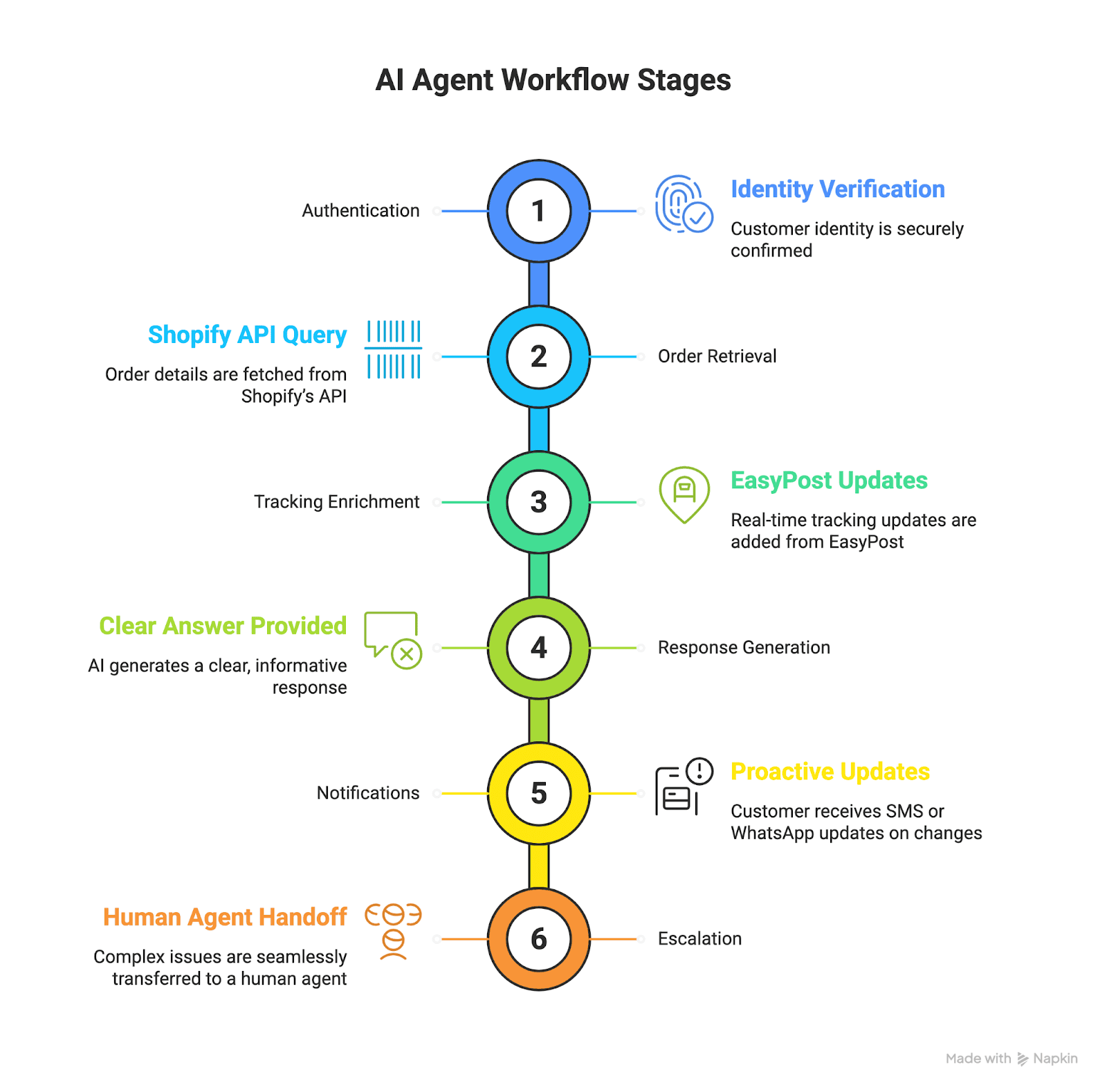
The workflow is the fixed sequence the agent follows in every conversation. A basic version has six steps:
Authenticate the customer through email, a one-time code or a secure status link.
Retrieve the order details from Shopify's API.
Add current tracking events from EasyPost.
Give a clear answer built only from the tool results, such as "Your order is in transit and should arrive Tuesday."
Notify the customer through SMS or WhatsApp if something changes, such as a delay.
Escalate to a human agent, passing the full conversation context, when the agent cannot solve the issue.
The agent answers routine questions, and complex or unusual cases stay with human agents.
AI Agent Guardrails for Customer Support
Customers only trust an AI agent that stays accurate and respectful. The agent needs three guardrails:
Content filtering checks what goes into the model and what comes out. Amazon Bedrock Guardrails helps block harmful prompts and responses and can block or mask personally identifiable information (PII). Azure AI Content Safety detects harmful user-generated and AI-generated content.
Groundedness rules stop the agent from stating any order fact that a tool result does not back up. If no carrier update exists, for example, the agent escalates to a human instead of guessing.
Privacy safeguards mask personal data in logs, tokenize IDs and share order details only through secure links.
Supporting WhatsApp, Voice and Web Chat in One Agent
The agent must keep one conversation record as customers move between web chat, WhatsApp and the phone. Someone whose question starts in chat and ends in a call shouldn't have to give their order number again.
For voice, OpenAI's documentation says that with SIP and the Realtime API you can direct incoming phone calls to the API. As of October 2026, it also says a phone call can reach GPT-Live through a SIP trunk or through an application that relays audio.
On WhatsApp, Twilio's Business API lets businesses send verified order updates and handle two-way conversations. WhatsApp also offers calling for businesses, but availability differs by country and by call direction. Check Meta's current documentation before planning voice on WhatsApp.
Zendesk Sunshine Conversations keeps that record in one place. It gives access to all of a user's conversations across channels such as web messaging, WhatsApp and SMS, so customers don't have to repeat themselves when they switch.
Four Stages to Deploy AI Agents for Order Tracking
Deployment runs in four gated stages: foundation, build, pilot and scale. Each stage has a goal, owners and acceptance criteria.
Stage 1, Prepare Systems and Data Contracts
Goal: Create a safe, minimal working system that can return factual order and tracking data.
What to do and why it matters:
Confirm business scope and acceptance metrics. Decide which customer intents the agent must handle at launch, for example, order status, basic cancellations, returns initiation, and refund eligibility. These scope decisions drive all technical work.
Define data contracts. Produce function schemas for each backend operation the agent will call, for example, getOrder(locator) and getTracking(carrier, trackingId). These contracts must specify input types, required fields, and exact output JSON structure so the agent always receives the same shape of data.
Provision API access to commerce and carriers. Create scoped credentials for Shopify or your OMS and for EasyPost or your chosen tracking aggregator. Use read-only keys for status lookups and separate keys for privileged actions.
Implement basic channel plumbing. Stand up a test web chat widget and connect a WhatsApp/SMS sandbox, and enable a test voice endpoint if you plan to use voice later.
Put basic guardrails in place. Configure content filters and a minimal rule that blocks any response claiming order facts unless a successful getOrder and getTracking call returned data.
Who owns it:
Product Manager to define scope and success metrics
Backend Engineer and Data Engineer to define contracts and wire APIs
DevOps to provision credentials and sandboxes
Security lead to set guardrail defaults
Deliverables and acceptance:
Function schemas documented and signed off
Working API connections in a test environment
A simple chat and messaging sandbox that can display factual data returned from the APIs
A minimal safety rule that prevents unverified claims
When this stage is complete, you have a safe sandbox that proves the agent can fetch real data and not invent answers. The next stage is to build the agent logic and the human handling paths on top of that foundation.
Stage 2, Build Agent Logic, Tools and Human Handoff
Goal: Implement the AI agent core, its tool integration, and the handoff paths for escalation.
What to do and why it matters:
Implement the cognitive layer that calls the functions defined in the data contracts. Ensure every user-visible order or ETA statement in the agent response is sourced to a tool return in your logs.
Build strict tool call logic. The agent should only format and surface the data the tools return. If a tool returns no data or an error, the agent must follow a scripted fallback: apology, short explanation, and escalation offer.
Create human escalation flows. When the agent cannot resolve the issue, it should open a ticket in your helpdesk with the conversation transcript, API call logs, and suggested next steps for the agent. Include a short summary the human agent can read in 10 seconds.
Develop policy prompts and templates. Create short, explicit templates that tell the agent how to phrase answers, how to refuse when necessary, and how to ask clarifying authentication questions.
Implement basic telemetry. Log each conversation, the tool calls made, the tool outputs, whether the interaction was solved or escalated, and safety filter activations.
Who owns it:
AI Engineer to implement the LLM integration and tool calls
Backend and Integration Engineers to surface the data reliably
Support Ops to design the escalation content and ticket templates
Observability Engineer to wire logs and traces
Deliverables and acceptance:
Agent that returns grounded answers in test conversations
Escalation tickets created automatically with all necessary context
Policy templates that are tested against sample prompts and obey safety rules
Telemetry that captures tool call success/failure and escalation counts
When this stage passes acceptance tests, you have a functional agent that is prevented from inventing facts and that hands off properly to humans. The next stage is to validate performance with real users in a controlled way.
Stage 3, Pilot With Real Traffic and Limited Scope
Goal: Run the agent with a subset of customers to measure real behavior and tune it for production.
How to run the pilot:
Choose a pilot cohort, such as a small percentage of traffic or a customer segment with simple order patterns and few returns. This reduces noise while you measure behavior.
Set your own containment target for order status queries before launch, based on your baseline. Also require zero groundedness lapses, meaning the agent never states a fact that a tool has not confirmed.
Track automated containment rate, escalation rate, first-contact resolution, AHT for human-handled cases, CSAT and safety filter activations on live dashboards.
Review a daily sample of conversations that were auto-resolved, escalated or flagged by safety filters, and use what you find to refine prompts, guardrails and escalation summaries.
Route suspicious or high-value cases to a live agent for confirmation, and use those examples to improve the agent over time.
Who owns it:
Product and Support leads to choose cohorts and acceptance thresholds
Data and Observability to create dashboards and daily reports
AI and Prompt Engineers to tune behavior rapidly based on observations
Customer Support to own live human review and agent feedback loops
Deliverables and acceptance:
Pilot metrics meeting or exceeding containment and CSAT thresholds you set
No production security incidents
Clear action list of prompt, tool, or data fixes resulting from pilot reviews
A successful pilot shows the agent works with real users. It also brings out quirks that a test environment can't reproduce.
Stage 4, Scale With a Gradual Ramp and Production Controls
Goal: Expand agent coverage and traffic while preserving safety and metrics.
Steps to scale:
Increase traffic in measured steps while watching the KPIs. Gate each increase with checklists for containment, error rate and CSAT.
Harden reliability by adding redundancy for API calls, caching non-critical data and applying rate limiting with backoff so carriers and the OMS don't throttle requests.
Once order status is stable, add returns, cancellations and policy lookups one at a time, each with its own pilot and acceptance criteria.
Set up automated alerts that trigger when groundedness errors or safety violations exceed thresholds, or when escalation volume spikes unexpectedly.
Store high-value transcripts and labeled outcomes to expand validation and retraining datasets.
Who owns it:
Engineering leaders for scaling strategy and reliability
DevOps for infrastructure scaling and cost optimization
Legal and Compliance for expanded geographic coverage and data residency
Product and Data Science for ongoing model evaluation
Deliverables and acceptance:
Full monitoring and automated alerts in production
Stable containment and CSAT at scale
Documented rollback plan and canary release procedures
When production KPIs stabilize, you can consider the agent part of your standard support stack and begin continuous improvement cycles.
How to Test an AI Support Agent Before and After Launch
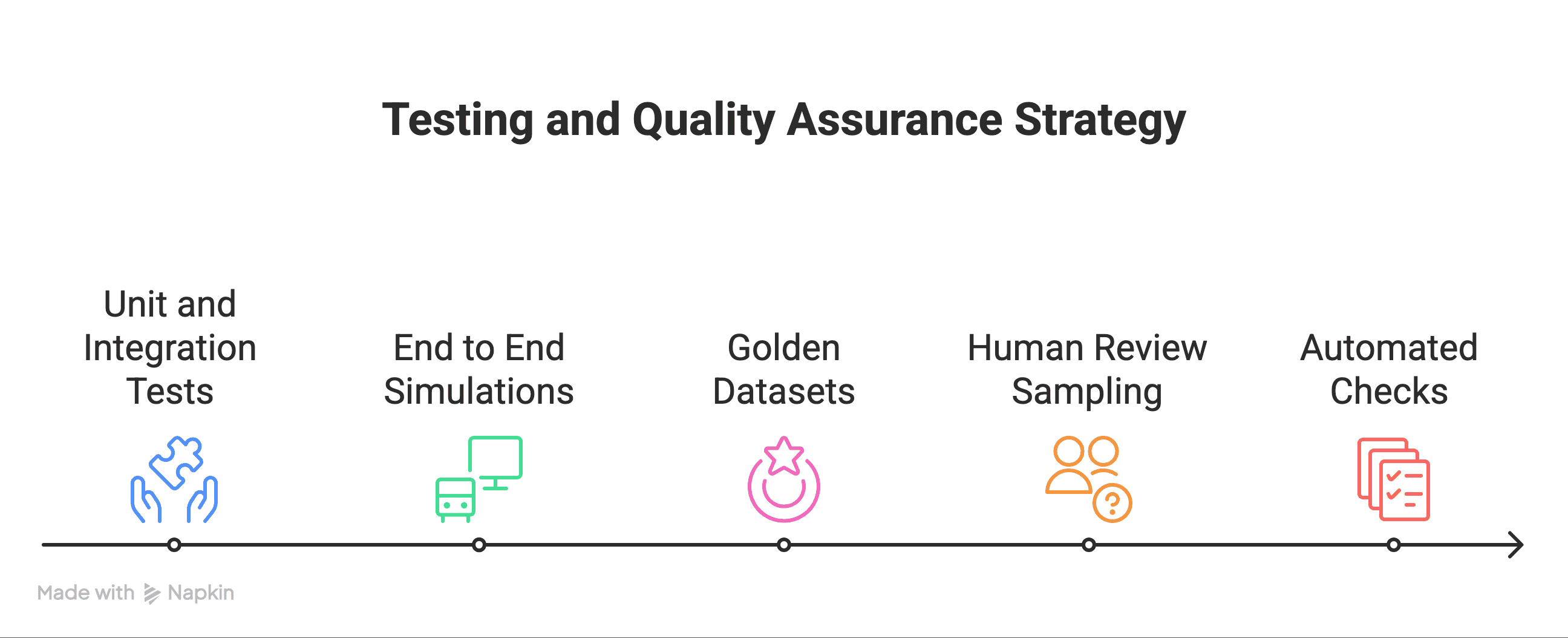
Test the agent before the pilot and keep testing after launch. A prompt edit or a model update can break answers that worked the day before. A practical test suite has four parts:
A fixed set of golden conversations for each intent (order status, cancellation and return eligibility). Each one lists the tool calls the agent should make and the answer it should give.
Contract tests that confirm getOrder and getTracking still return the documented schema, with every required field present.
Groundedness tests in which the tools return empty results or errors. The agent passes only if it escalates without stating an order fact.
A full rerun of the suite on every prompt, model or tool-contract change, before that change is released.
A failed test blocks the release. Keep the results of every run so that when a regression appears, you can trace it to the prompt, model or data change that caused it.
Monitoring, Alerts and Incident Response for AI Support Agents
A clear runbook prevents small problems from becoming outages. The runbook should cover:
Define alerts for high error rates, sudden spikes in escalations, or safety filter activations.
Create a priority matrix that maps alert severity to response SLAs and owners.
Prepare a rollback checklist that includes how to disable the agent on a channel, how to route traffic back to human agents, and how to preserve logs for postmortem.
Hold regular postmortems on incidents and feed the findings back into prompts, guardrails, and tool contracts.
A tested operational playbook keeps customer impact small and fixes fast.
KPIs and Acceptance Criteria for AI Order Tracking
Use measurable targets to judge success and to gate rollouts:
Containment for order status in the pilot, measured against a target your team sets in advance from its own baseline.
Average handle time for human agents, which should drop measurably from the pre-launch baseline.
CSAT, which should match or beat the human-only baseline.
Groundedness error rate, with zero critical incidents and a very low acceptable rate for minor issues.
Escalation quality, measured as the share of escalations that humans resolve without asking the customer for more information. Set an internal threshold before the pilot starts.
Show these metrics on dashboards and review them in regular business reviews.
AI Agent Deployment Checklist for Order Tracking
Use this list to track readiness:
Define scope, success metrics, and acceptance gates.
Document function contracts for order retrieval and tracking.
Provision test API keys for OMS/Shopify and a tracking aggregator.
Implement minimal guardrails that prevent unverified claims.
Build a simple web chat and a WhatsApp sandbox for pilot testing.
Prepare human escalation templates and ticket creation rules.
Create dashboards for containment, CSAT, AHT, escalation rate, and groundedness errors.
Plan phased ramping with canary releases and rollback steps.
When each box is checked, you are ready to move from foundation to pilot and then to scale.
Planning Your AI Order Tracking Pilot With Arbisoft
Launch with order status only. Add returns and cancellations once the pilot meets the containment target your team set and has zero groundedness failures. If either gate slips, fix the tool contracts or prompts before widening scope, because each new intent brings its own policies, edge cases and escalation paths to test.
Arbisoft has 19+ years of building custom solutions and applications. Our team builds ecommerce chatbots and support agents that connect to order, carrier and helpdesk systems. To scope a pilot, see our ecommerce AI chatbot and customer support solutions. For model work beyond support, see our generative AI services.
Frequently Asked Questions About AI Order Tracking Agents
Do we need Shopify to deploy an AI order tracking agent? No. Any order management system or commerce platform with an order API will work, as long as it can return data in the shape your getOrder contract defines. Shopify is just the example this guide uses.
Should the AI agent issue refunds on its own? Not at first. Have the agent check eligibility and start the refund request. The refund itself should go through privileged API keys and human approval. Once pilot data shows the agent judges eligibility correctly, you can decide whether to automate more of that step.
When does an off-the-shelf chatbot make more sense than a custom agent? An off-the-shelf chatbot fits a standard Shopify setup with one carrier and simple return policies. A custom agent is worth the build effort when you run your own OMS, ship with several carriers, apply custom return rules or have strict data-residency requirements. Those setups need integrations and policy logic that a packaged chatbot may not support.
How long should the pilot run before scaling? Our view is that the pilot should run until the metrics hold steady across full weekly order cycles, including at least one busy period such as a sale. A fixed number of days can miss weekend backlogs and carrier delays.


 Add as preferred on Google