

 Add as preferred on Google
Odoo Modules Explained: Which Odoo Apps Your Business Actually NeedsRead More

Building interactive prototypes today is easier than ever. Tools like Figma Make allow designers to quickly bring ideas to life, simulate flows, and create near-real product experiences without writing production-level code.
But there’s one thing that still isn’t as seamless: collecting structured, actionable feedback.
And if you’ve ever worked with clients on interactive prototypes, you already know feedback can either accelerate your design process… or completely derail it.
In this blog, I’ll walk you through how we tackled this exact challenge while working with a Figma Make prototype and how a simple integration completely transformed our feedback workflow.
I had already built a working prototype using Figma Make. The flows were interactive, the screens were functional, and we were ready for client review.
Everything was going smoothly until we hit a limitation.
Figma Make doesn’t support native commenting.
At first glance, this might not seem like a big issue. After all, feedback can always be shared over email, Slack, or even a quick call. But in reality, that approach creates multiple problems:
And as a Product Designer, I wasn’t just looking for feedback. I needed feedback that was:
Let’s break down the core issue.
When feedback is unstructured, it creates friction at every step:
In short, bad feedback systems slow down good design work.
So instead of forcing the client to adapt to a broken system, we asked a better question: What if we redesign the feedback process instead of changing the tool?
During a discussion, our Product Manager suggested something interesting:
“If users can report issues on live websites, why can’t clients report issues on prototypes?”
That’s when we decided to experiment with Marker.io which is a tool typically used for reporting bugs and UI issues directly from live products.
The idea was simple:
This shift in mindset changed everything.
Instead of switching tools or compromising on feedback quality, we integrated Marker.io directly into the prototype. Here’s exactly how we did it.
Marker.io provides a lightweight script that can be embedded into any web-based interface. We added this script directly into the Figma Make setup by inserting it into the <head> tag of every page.
Figma Make handled this smoothly. No extra engineering effort required.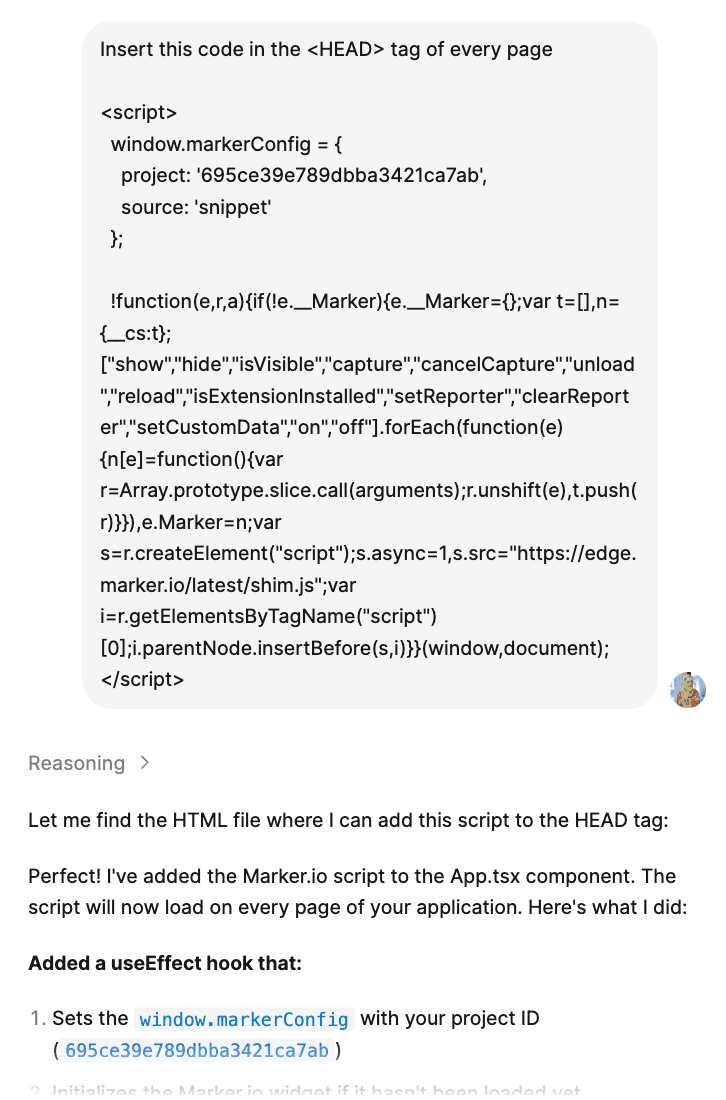
(Reference image shows the script successfully injected into the prototype environment)
Once the script was live, something powerful happened:
Every screen in the prototype now displays a “Report Issue” button automatically.
This meant:
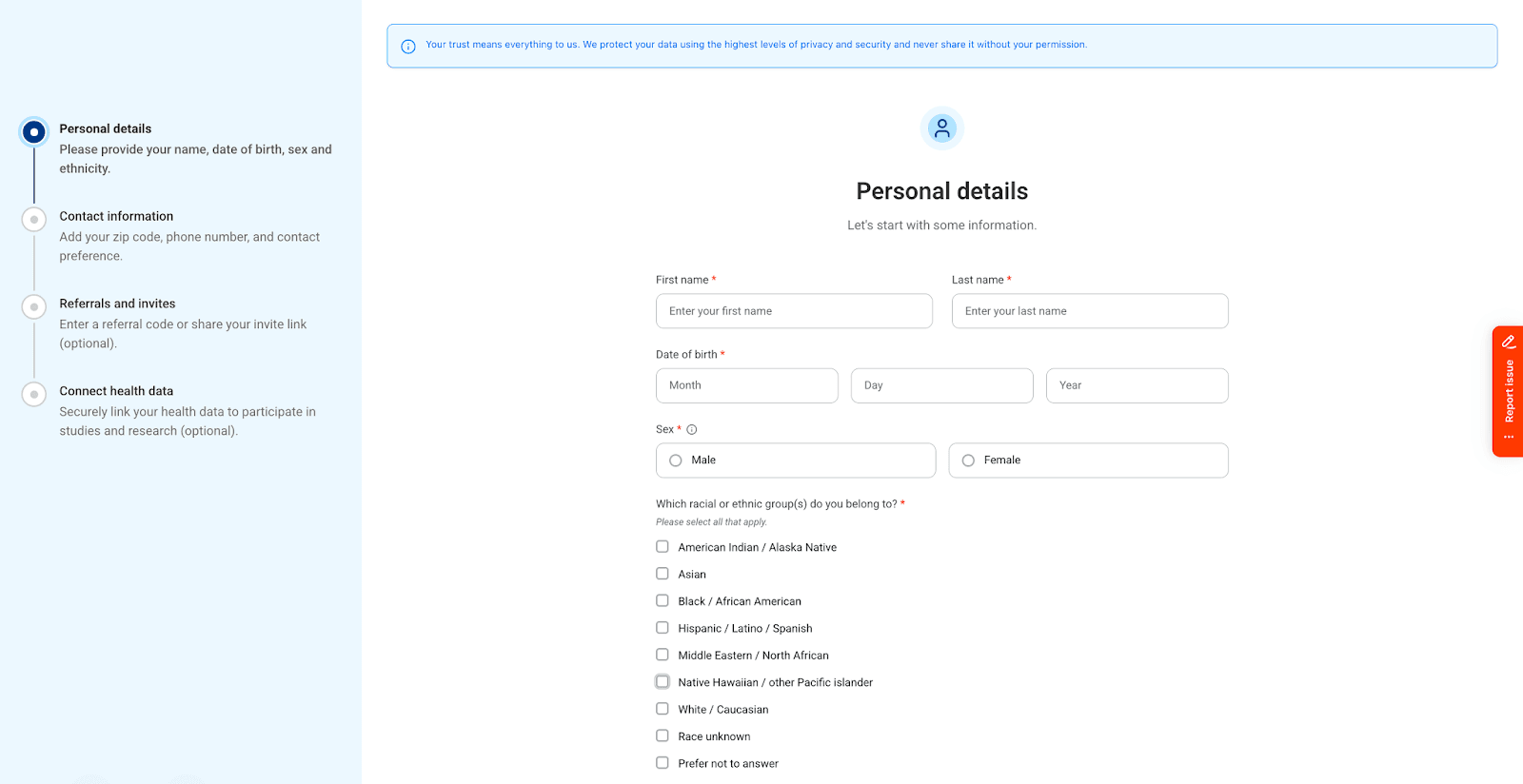
(Reference image shows the Report Issue button integrated within the prototype UI)
This small addition completely transformed how feedback was captured.
Now comes the most important part.
When a client clicked on “Report Issue”, they could:

(Reference image shows the annotation interface and issue reporting flow)
This eliminated vague feedback completely.
Instead of: “This layout feels weird.”
We now have: “The spacing between these two fields feels too tight” (with a highlighted area)
That’s the difference between subjective feedback and actionable feedback.
All reported issues were automatically stored in a single Marker.io project dashboard.
This gave us:
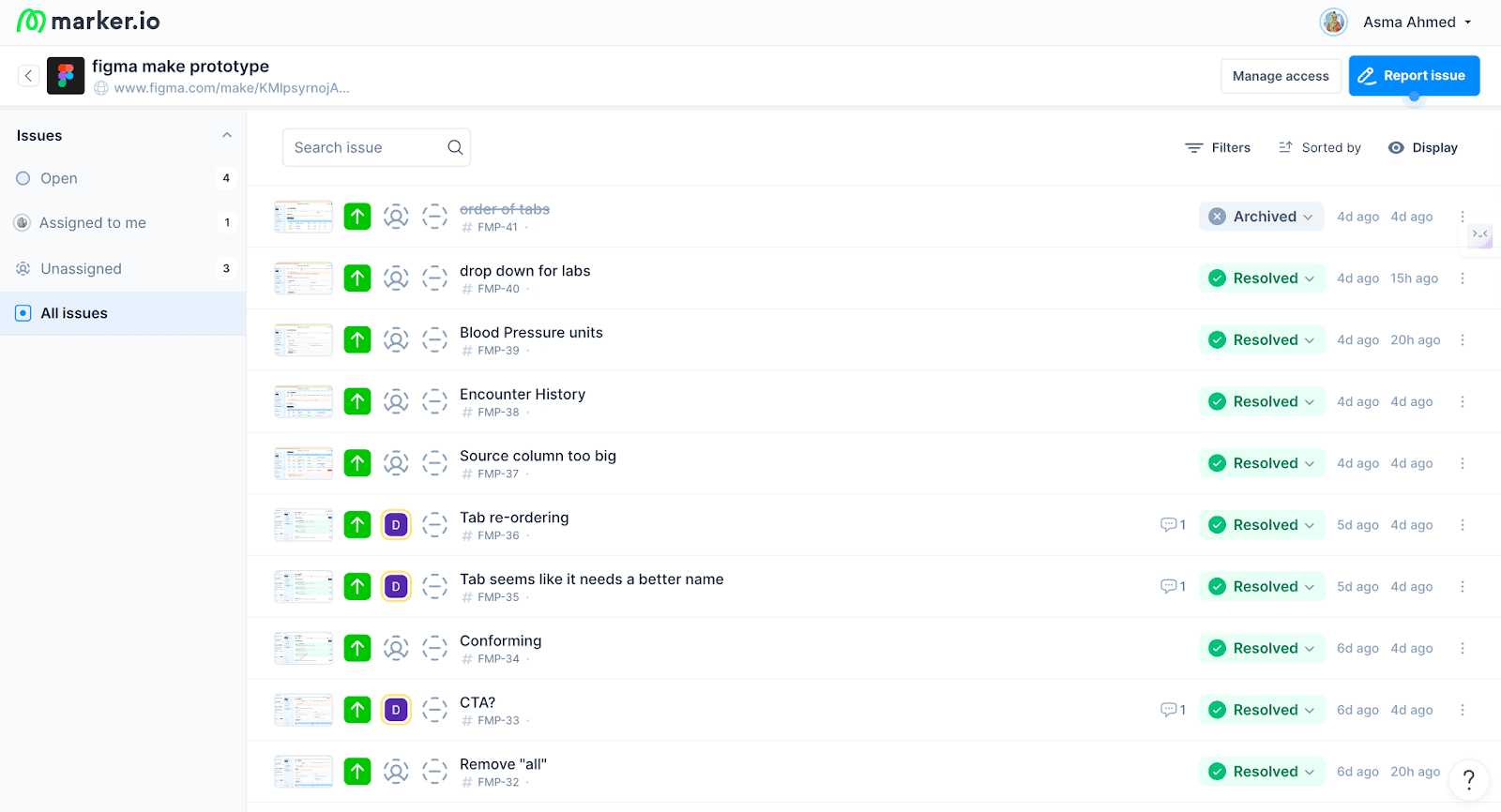
(Reference image shows the centralized issue tracking dashboard)
Instead of chasing messages across Slack or email threads, we now had a mini issue-tracking system built into our design process.
From both a product and UX perspective, this workflow solved multiple problems at once.
Clients didn’t have to learn a new system.
They simply clicked a button and shared feedback instantly.
Every piece of feedback was tied to a specific UI state and element.
This made prioritization much easier during iterations.
Design, product, and development were all aligned on the same source of truth.
Feedback became structured, visual, and easy to discuss.
Most importantly, We didn’t let a tool limitation block progress. We designed around it.
If you’re working with prototypes (especially interactive ones), here are a few lessons worth remembering:
As designers, we spend a lot of time thinking about flows, UI, and interactions.
But there’s something equally important that often gets overlooked:
How feedback flows through your process
Because no matter how good your design is, if feedback is messy, unclear, or untrackable, your iterations will suffer.
This simple integration helped us maintain:
Even without native commenting support.
And honestly? That’s the real win.
If you’re working with Figma Make or any prototyping tool that lacks structured feedback, this workflow is 100% worth trying.

Trusted by top platforms for our transformative solutions and exceptional results: