
 Add as preferred on Google
How to Modernize a Legacy Learning Platform Without a Full RewriteRead More
Enterprise data teams have spent years trying to make analytics more accessible without weakening governance. The Databricks Genie update for Microsoft Teams and Microsoft 365 Copilot pushes that challenge into a familiar workspace: the chat, meeting, and productivity tools employees already use every day.
While conversational analytics still requires substantial governance and configuration, this update changes how enterprise users can access governed data inside daily workflows. Enterprise data insights are moving closer to where decisions are discussed, and that raises new questions for CIOs, CTOs, data leaders, and security teams.
Databricks Genie is a natural-language analytics experience within Databricks AI/BI. It lets users ask questions about governed data and receive generated answers, charts, or summaries based on curated data assets.
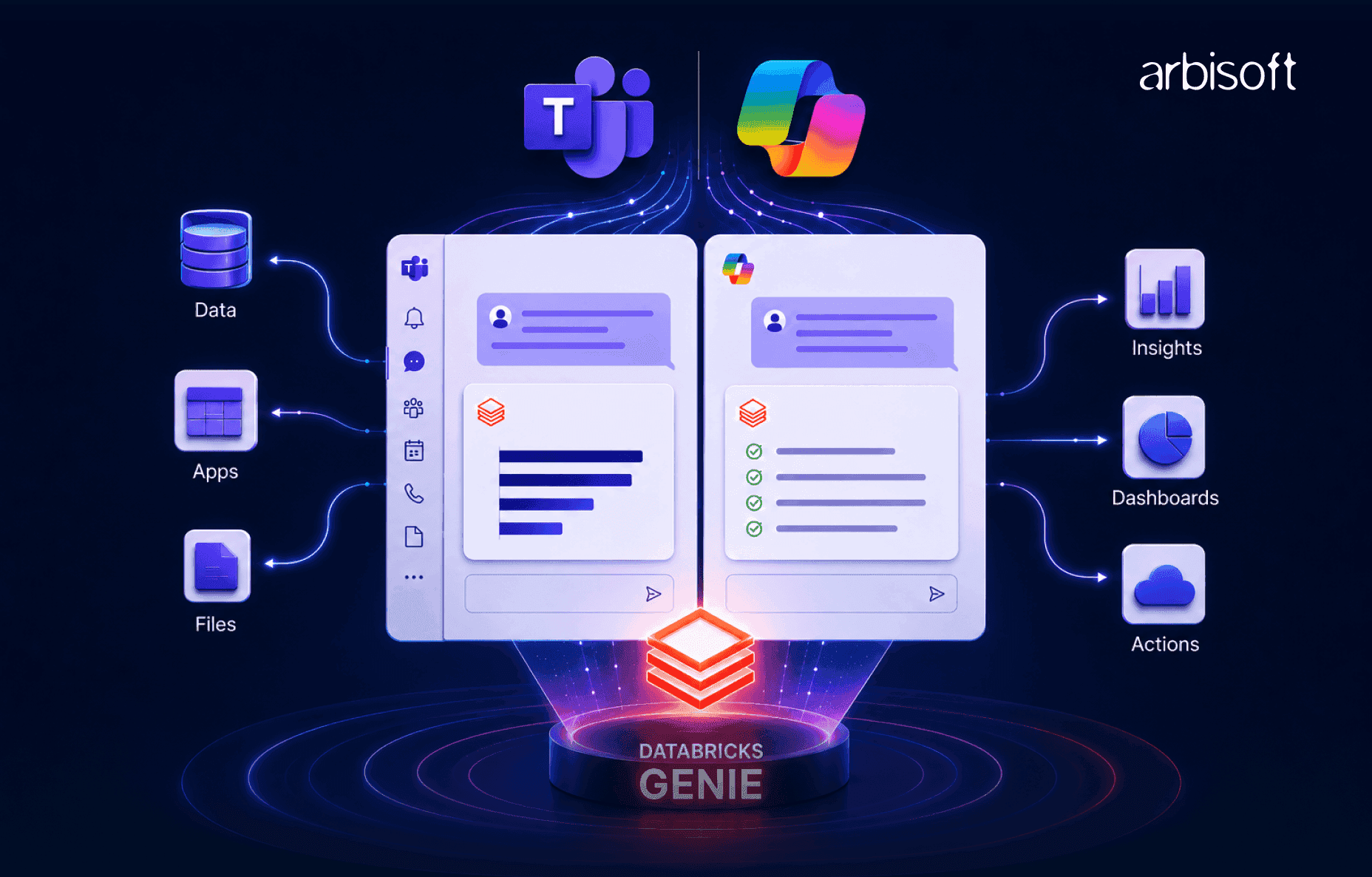
The update matters because Databricks and Microsoft now support a pattern where AI/BI Genie spaces can be connected to Microsoft Copilot Studio agents using the Model Context Protocol. Those agents can then be published into Microsoft Teams and Microsoft 365 Copilot experiences.
In practical terms, this means a business user could ask a data question in Teams or Microsoft 365 Copilot, and an approved agent could call a specific Genie space to return an answer grounded in Databricks data.
This setup still depends on tightly scoped permissions, governed access, and administrative controls. Its effectiveness relies on how well the organization structures authentication, permissions, Genie spaces, governance policies, and operating processes.
For enterprise leaders, this update embeds governed analytics directly into collaboration environments where decisions already happen. Instead of asking users to leave a conversation, find a dashboard, interpret a metric, and return with an answer, the data interaction can begin where the question arises.
Workplace artificial intelligence can summarize meetings, draft content, and retrieve documents. But many enterprise decisions depend on structured business data: revenue, pipeline, churn, inventory, service levels, customer behavior, or operational risk.
That is where governed data access becomes critical. A workplace assistant is more valuable when it can reach trusted analytical datasets, but only if it respects the same access controls, definitions, and accountability expectations as the rest of the data platform.
Databricks Genie contributes the conversational analytics layer. Microsoft Teams and Microsoft 365 Copilot contribute the work surface. Copilot Studio provides the agent and connector path that allows organizations to expose a controlled Genie capability inside Microsoft workflows.
The strategic value comes from integrating governed enterprise data into routine workplace collaboration. Employees can access trusted data within existing workflows instead of relying solely on separate business intelligence portals.
However, if data quality is weak, metric definitions are inconsistent, or access policies are too broad, putting a conversational interface on top may amplify confusion. Conversational analytics rewards strong data foundations and exposes weak ones.
When Genie is surfaced through Microsoft Teams or Microsoft 365 Copilot, the user experience changes from “go to the analytics tool” to “ask from the workflow.” A Teams user may interact with a Copilot Studio agent that calls a Genie space, retrieves a response, and returns it to the conversation.
The underlying work still depends on Azure Databricks, configured Genie spaces, governed data, Microsoft Power Platform connections, Copilot Studio agent setup, and Teams or Microsoft 365 deployment controls.
This integration expands how users reach governed data while preserving the underlying responsibilities of the data platform. Data engineers continue modeling data, analysts maintain metric definitions, governance teams enforce permissions, and administrators retain control over deployment and tenant policies.
Dashboards are designed around known questions. They work well for recurring metrics, standardized reporting, and executive views. Conversational analytics is designed for follow-up questions that may not have a dashboard tile waiting for them.
A business user might ask how the current pipeline compares with the same period last year, or which region contributed most to a recent variance. Genie can translate natural-language questions into structured data queries, assuming the relevant data and semantic context are well prepared.
However, inconsistent business definitions can create significant reliability issues too. If “active customer,” “net revenue,” or “qualified pipeline” means different things across teams, a conversational answer may sound confident while using the wrong definition.
A useful validation habit is to ask: What metric definition was used? What filters were applied? What timeframe was selected? Can the answer be reconciled with a canonical dashboard or query?
Putting Genie inside Teams and Microsoft 365 Copilot can reduce context switching. The question, answer, and follow-up discussion can happen in the same workspace where the decision is already being discussed.
This could improve adoption for users who rarely open analytics portals but actively participate in Teams channels, meetings, and Microsoft 365 workflows. It also helps data teams bring governed insights into existing collaboration habits rather than asking the business to form new ones.
Chat-based analytics can accelerate access, but important metrics still require durable reference points. Teams should still link back to canonical dashboards, metric definitions, or governed reports when decisions depend on the answer.
Organizations need to ensure that conversational systems enforce user-specific access controls and accurately interpret business terminology according to governed definitions.
Databricks Unity Catalog provides governance capabilities such as centralized access control, data discovery, lineage, auditing, and fine-grained permissions. In a well-configured setup, Genie should operate against governed assets rather than raw, uncontrolled data.
On the Microsoft side, Teams, Microsoft 365 Copilot, and Copilot Studio introduce their own identity, deployment, and compliance considerations. Enterprises should verify how authentication maps to Databricks identities, whether users authenticate individually, and whether permissions are enforced consistently across the integration.
Before piloting, security and data governance teams should request architecture diagrams, access-control documentation, audit log coverage, and a clear explanation of how sensitive data is protected.
The primary benefits center on operational efficiency and governed accessibility. Genie inside Microsoft Teams and Microsoft 365 Copilot can reduce friction around routine data questions, improve access to trusted analytics, and connect data more directly to collaborative decision-making.
Enterprises should validate these benefits through controlled pilots and measurable benchmarks. Without strong data quality, governance, and semantic consistency, the same interface can also accelerate misunderstanding and poor decision-making.
The strongest near-term use case is routine question answering. Business teams often ask analysts for basic cuts of data because dashboards are hard to find, filters are unclear, or the question does not fit an existing view.
A governed Genie space can help users answer some of those questions directly. That may reduce simple reporting requests and shorten time-to-insight for common operational questions.
But this does not remove the data team. It changes the data team’s role. Data teams still curate datasets, define metrics, configure Genie spaces, manage governance, monitor answer quality, and improve the semantic layer over time.
A useful pilot metric is not only “How many questions were answered?” It is also “How many answers were accurate, useful, trusted, and aligned with approved definitions?”
Teams and Microsoft 365 Copilot are already central to many enterprise workflows. Bringing Genie into those environments can make analytics feel less like a separate activity and more like part of a normal discussion.
For example, a sales operations team reviewing the pipeline in a Teams channel could ask a follow-up question without leaving the thread. A finance team discussing variance could request a breakdown by region or product line. A customer success team could explore account trends during a weekly review.
The governance challenge is that answers in chat can travel without context. Screenshots, copied summaries, or partial interpretations can create confusion. Important answers should be tied back to governed reports, metric definitions, or documented decisions.
Self-service analytics has always promised broader access with central control. In practice, many programs struggled with conflicting metrics, duplicate reports, and shadow spreadsheets.
Conversational analytics raises the stakes because users may not see the underlying tables, filters, or calculations. That makes governance, lineage, and semantic definitions even more important.
If an enterprise already has strong catalog coverage, clear metric owners, quality monitoring, and role-based permissions, Genie can become a more accessible interface to trusted data. If those foundations are missing, the integration may reveal gaps faster than it solves them.
Enterprises should evaluate this update carefully before broad deployment. It introduces product, governance, accuracy, security, and change-management considerations that require structured review before scaling.
The integration has also been described in preview-oriented terms in the research, which means enterprises should verify current availability, support commitments, licensing dependencies, and deployment constraints before treating it as a standard production pattern.
Generative AI systems can produce confident but incorrect responses. In analytics, the risk often comes from ambiguous business language, incomplete metadata, poor data quality, or unclear metric definitions.
Genie can reduce some risk by grounding answers in structured Databricks data and governed assets. It cannot compensate for every weak definition or bad dataset.
Enterprises should define validation workflows for early use. That may include sampling Genie conversations, comparing answers with canonical dashboards, requiring review for high-stakes decisions, and giving users a simple way to flag questionable results.
The rule of thumb is simple: conversational answers can support analysis, but they should not automatically become the final authority.
The security model needs careful review because this workflow spans Databricks, Microsoft Power Platform, Copilot Studio, Teams, Microsoft 365 Copilot, identity systems, and enterprise governance policies.
The key question is whether each user’s access is enforced at the right level. Shared service accounts, overly broad permissions, or poorly controlled agent publishing could undermine the governance benefits.
Security teams should verify the authentication flow, requested scopes, Unity Catalog permissions, Teams app policies, Copilot Studio governance, audit logs, retention policies, and incident response coverage.
Sensitive data should not be exposed simply because a chat interface makes it easier to ask questions. Least privilege still applies.
Effective deployment depends on coordinated ownership across the teams responsible for data, governance, security, platform administration, and business adoption.
Data platform teams own governed datasets, Genie spaces, semantic definitions, and quality controls. Microsoft 365 and Power Platform teams own agent deployment, app governance, and tenant-level controls. Security and compliance teams define risk boundaries. Business units own use-case selection and responsible adoption.
Friction appears when those responsibilities are unclear. Business teams may experiment without enough governance. IT may restrict access so tightly that the tool feels useless. Data teams may inherit support work without additional capacity.
Healthy adoption should show steady use in targeted domains, low rates of serious answer errors, constructive feedback, and improving alignment between Genie outputs and approved analytics assets.
For enterprise leaders, the Databricks Genie update is a signal that the interface for analytics is changing. Data platforms and collaboration platforms are becoming more tightly connected through AI agents and governed conversational experiences.
The right question is not “Should every employee ask every data question in Teams?” The better question is “Which governed data interactions belong inside daily workflows, and what foundation must be in place first?”
Before expanding access, leaders should assess the data foundation behind the experience.
The most important checks include:
If these artifacts are hard to produce, broad conversational analytics may be premature. A limited pilot can still be useful, but it should be framed as a governance readiness exercise as much as a productivity test.
Genie in Teams and Microsoft 365 Copilot should be treated as a complementary interface, not a universal replacement for dashboards, business intelligence tools, notebooks, or analyst-led workflows.
Dashboards remain better for recurring, standardized views. Business intelligence tools remain useful for structured exploration and reporting. Analysts and data scientists remain essential for complex investigation, modeling, and interpretation.
Conversational analytics fits best where users need quick, governed answers to well-scoped questions during collaborative work. Leaders should define those use cases clearly to avoid tool sprawl and unrealistic expectations.
A responsible pilot should begin with a checklist across four areas: architecture, governance, security, and business value.
At a minimum, leaders should ask for:
Pilot domains should be well governed, useful to the business, and moderate in risk. Avoid starting with highly sensitive datasets or decisions that require formal regulatory reporting.
The Databricks Genie update reflects a broader enterprise pattern: AI is moving from separate assistants into the tools where work already happens. For analytics, that means data questions increasingly appear inside conversations, meetings, and documents rather than only inside dashboards.
That shift can can reduce friction, improve adoption, and help teams bring governed data into decisions faster. But it also makes governance more visible and more important.
Enterprises with mature data foundations, clear ownership, strong access controls, and disciplined analytics practices are better positioned to benefit. Organizations with fragmented metrics, weak cataloging, or unclear permissions may need to strengthen the foundation before scaling.
For CIOs, CTOs, and data leaders, the most practical next step is a focused readiness review followed by a constrained pilot. Treat the update as an opportunity to test how governed conversational analytics fits into the enterprise operating model, not as a shortcut around the work that makes data trustworthy.
...Loading Related Blogs
Trusted by top platforms for our transformative solutions and exceptional results: