

 Add as preferred on Google
Odoo Modules Explained: Which Odoo Apps Your Business Actually NeedsRead More

Accessibility overlays are often marketed as quick fixes for making websites “fully accessible” with a single line of code or a small plugin. At first glance, this sounds ideal especially for teams under pressure to meet compliance deadlines. However, in practice, accessibility overlays rarely deliver meaningful accessibility improvements and can sometimes create new barriers for users with disabilities.
This blog explores what accessibility overlays are, why they are widely criticized in the accessibility community, and what a more sustainable approach to accessibility looks like.
Accessibility overlays are third-party tools that claim to improve website accessibility by injecting scripts into a webpage. These tools often provide features such as:
They are usually added with a single script tag and promise fast compliance with standards like WCAG (Web Content Accessibility Guidelines).
The key selling point is simplicity: “Install once, and your site becomes accessible.”
Unfortunately, accessibility does not work that way.
Real accessibility issues exist in the underlying HTML, ARIA implementation, and design structure. Overlays sit on top of the page rather than fixing these foundational problems.
For example:
An overlay may visually mask some problems, but assistive technologies still interact with the underlying code.
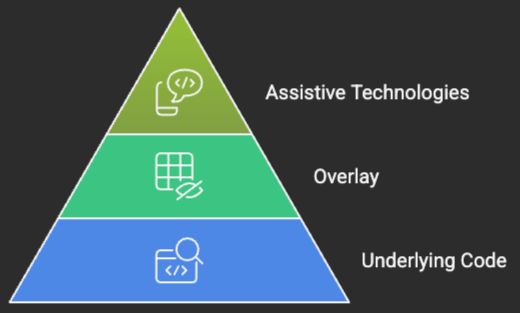
Screen readers, keyboard navigation tools, and browser accessibility APIs are designed to work directly with the DOM (Document Object Model).
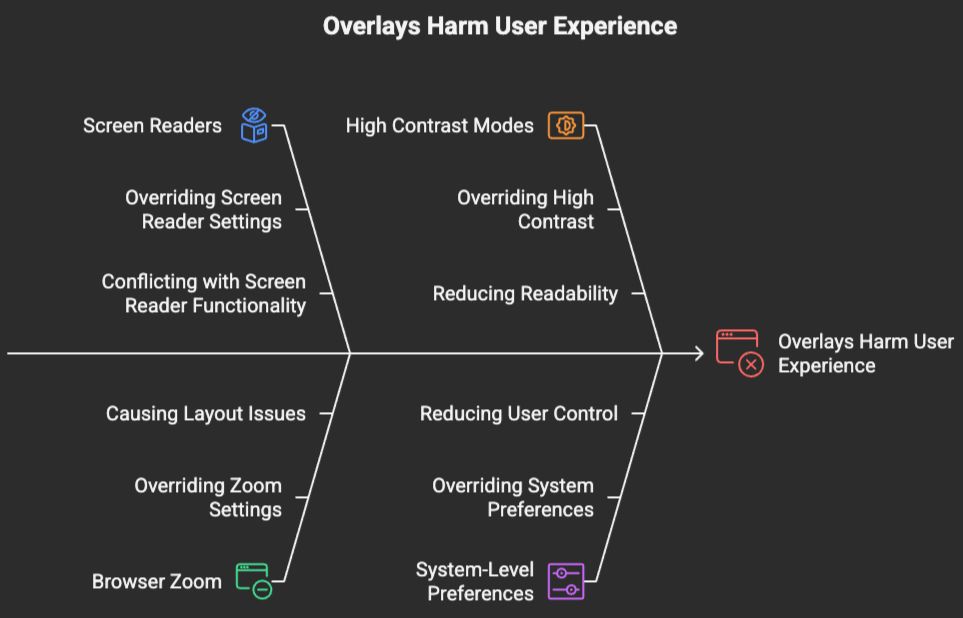
Overlays often:
Instead of improving accessibility, they can create unpredictable experiences for users who rely on assistive tools.
Many organizations adopt overlays thinking they will automatically achieve compliance with WCAG standards.
However:
As a result, relying on overlays can create a false sense of compliance.
One of the biggest concerns in the accessibility community is that overlays can discourage teams from learning and implementing real accessibility practices.
Instead of:
Teams may rely on overlays as a shortcut, which leads to long-term technical debt and repeated accessibility failures.
Users with disabilities often customize their own browsing experience using:
Overlays can override or conflict with these settings, reducing user control instead of improving it.
Accessibility should empower users not replace their preferences with a fixed layer.
Example 1:
A website uses an overlay to automatically add ARIA labels to form fields.
Screen reader users still struggle because the fields are missing proper <label> associations and error messaging relationships.
Root cause:
The overlay patched the UI visually but did not fix the actual semantic structure in the source code.
Solution:
Implement proper native labels, form associations, and accessible error handling directly in the component code.
Example 2:
An overlay adds keyboard support to clickable <div> elements using JavaScript.
The component still behaves inconsistently for keyboard and screen reader users.
Root cause:
The original component was built using non-semantic HTML instead of native interactive elements.
Solution:
Use semantic elements like <button> and implement accessibility during development instead of patching behavior afterward.
Example 3:
A React application uses an overlay to manage modal accessibility automatically.
After dynamic page updates, keyboard focus becomes unpredictable and screen readers lose context.
Root cause:
The overlay conflicts with the framework’s rendering lifecycle and focus management logic.
Solution:
Handle focus management directly within the application components and modal architecture.
True accessibility is not a plugin or a one-time fix. It is a development practice and design philosophy built into every stage of product creation.
It includes:
When accessibility is built correctly from the start, overlays become unnecessary.
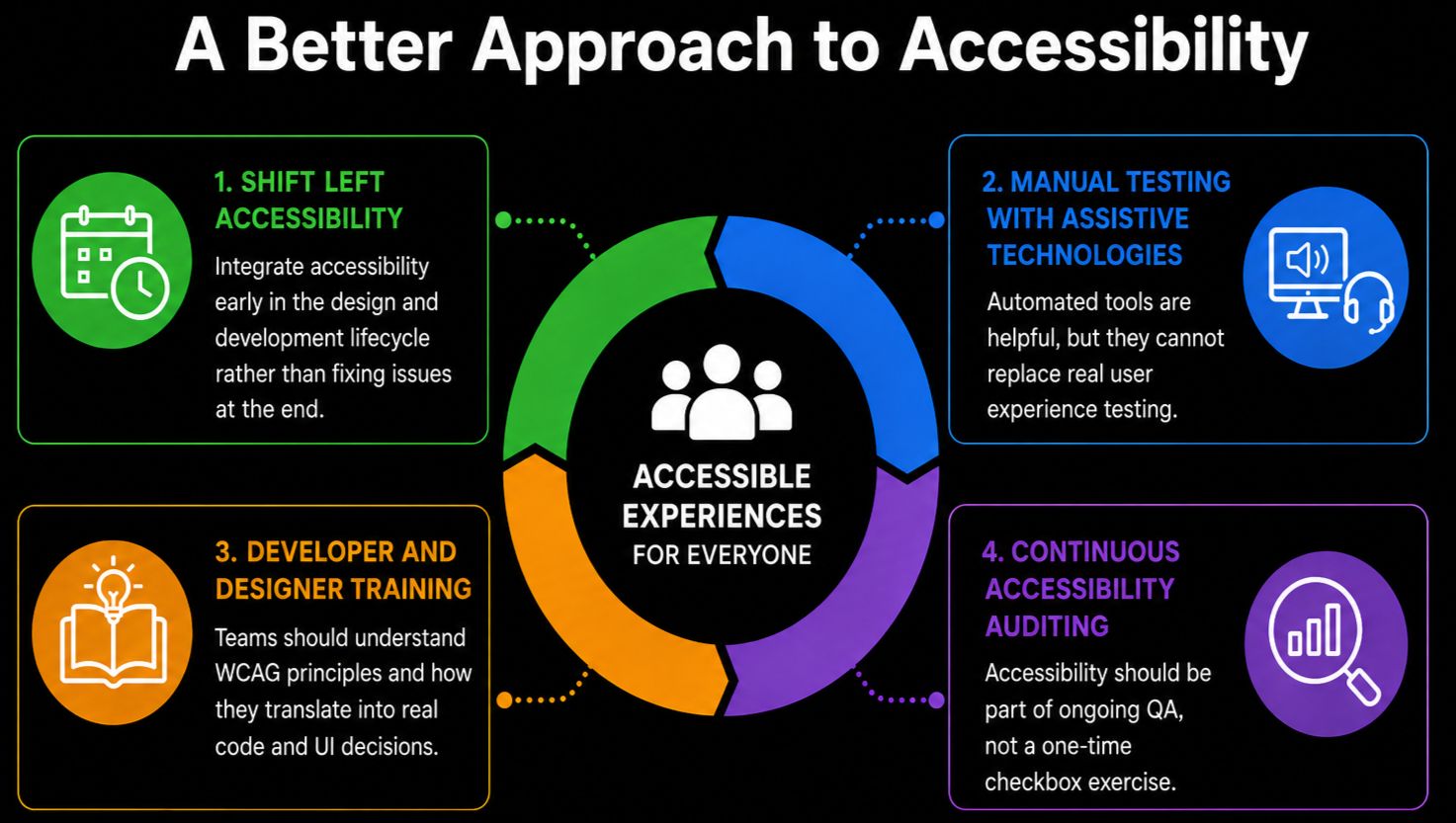
Instead of relying on overlays, organizations should invest in:
Integrate accessibility early in the design and development lifecycle rather than fixing issues at the end.
Automated tools are helpful, but they cannot replace real user experience testing.
Teams should understand WCAG principles and how they translate into real code and UI decisions.
Accessibility should be part of ongoing QA, not a one-time checkbox exercise.
Accessibility overlays may seem like a convenient solution, but they often provide only surface-level improvements while leaving core accessibility issues unresolved. In some cases, they even introduce new barriers for users who depend on assistive technologies.
Real accessibility requires commitment, not shortcuts. It is about building inclusive experiences from the ground up, ensuring that every user regardless of ability can interact with digital content effectively.
In the long run, investing in proper accessibility practices is not only more ethical but also more sustainable than relying on overlays that promise quick fixes but fail to deliver real inclusion.


Trusted by top platforms for our transformative solutions and exceptional results: