 Add as preferred on Google

PHP2Shell and the End of Unmanaged Open Source in Higher EducationRead More
We built two systems that answer questions about our internal policy documents, and then we made them compete. One is a conventional RAG pipeline. The other is GraphRAG. Both got the same 76 documents, the same model writing the answers, and the same list of 38 questions. Every answer was marked against a list of facts we expected to see in it. The rest of this goes through how we built them on Databricks, how the scoring worked, what the numbers came out at, and what it costs to run.
RAG is the search approach. Ask it something and it goes hunting through the documents for the few passages that come closest, then a language model writes the answer out of those. GraphRAG puts the effort somewhere else. It goes through the lot once beforehand and writes down what's actually in there, the roles, the teams, the tools, the benefits, and which of them link to which. After that, answering is just looking things up on the list it made. No fresh trip through the text.
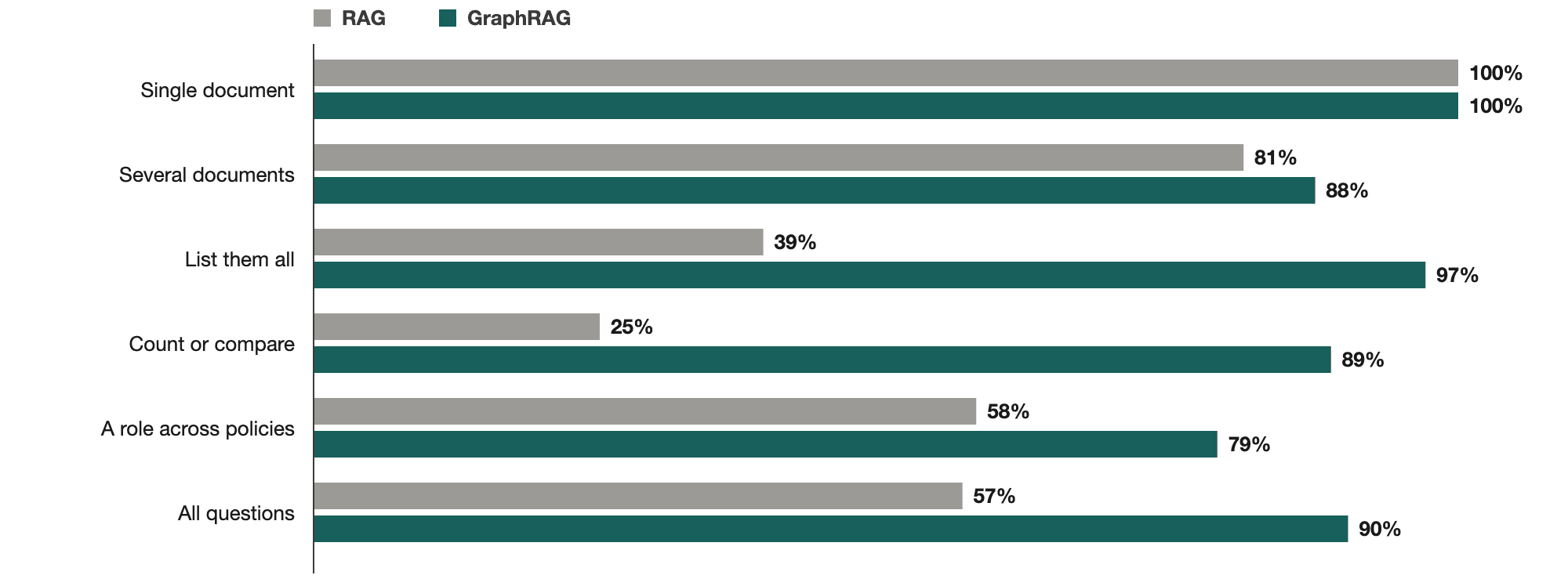
When the answer sat in one document, both systems found every fact we expected. 100% each. That was never the problem.
The trouble is questions that need all of something. Which documents mention the CEO. How many of them mention a certain tool. What a manager has to approve across every policy we have. On those "list them all" questions RAG found 39% of the facts it should have, GraphRAG 97%. Counting and comparing was worse again, 25% against 89%.
Over all 38 questions, each run twice, it came to 57% for RAG and 90% for GraphRAG. We also held 13 questions back and only wrote them once both systems were finished, so neither could have been quietly built around them. 51% and 87% on those.
None of it is free though. Before GraphRAG can answer anything at all, a model has to read every piece of every document, which was about 1,000 model calls for us, and that work comes back around every time a document changes. And 76 documents from one company isn't much to go on. But it was enough to convince us the approach holds up, and the build doesn't care whose documents it's reading. Point it at yours and the same test will tell you where you stand soon enough.
The first sign of trouble was a single test question: which of our documents mention the CEO? We already knew it was seven. RAG came back with two tidy sentences naming one or two of them, depending on the run, and on one occasion it added that it hadn't found any others. Nothing in the wording hinted that the answer was half missing. If we hadn't been holding the answer key, there'd have been no reason to doubt it.
This is a known weakness of RAG, so none of it was a shock. But we wanted actual numbers from our own documents before building anything serious on top of it. So we put together a baseline RAG system, built a GraphRAG system beside it, and pointed both at the same questions.
| Term | What it means here |
|---|---|
| Chunk | A small piece of a document, a paragraph or two. Ours were 1,800 characters at most. |
| Embedding | A list of numbers that stands for what a piece of text means. Similar meanings get similar numbers, which is how a search can find text that means the same thing without sharing any words. |
| RAG | Retrieval-augmented generation. Find the most relevant chunks, then a language model writes the answer from them. |
| Entity | Something named in the text: a role, a department, a benefit, a tool. |
| Relation | A link between two entities, like "this role approves that request". |
| GraphRAG | RAG with an extra step up front. It builds a graph of entities and relations from the documents, then answers by querying that graph. |
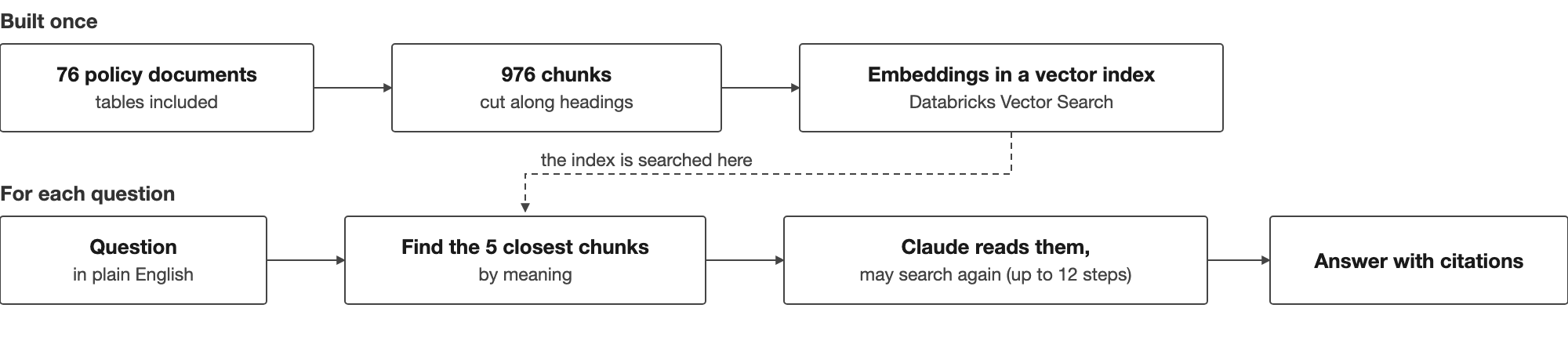
The 76 documents came out of Google Drive and went into a Databricks Volume, which is just a folder in the workspace where files can sit.
Each document then gets parsed, tables and all, and chopped up at its headings. A chunk tops out at 1,800 characters and anything bigger gets split again. The document title and section name go at the front of every chunk, so a chunk sitting on its own still says where it came from. 976 of them in the end, all in one Delta table, which is just a table in the workspace. Both systems read from that same one, so neither gets an easier version of the documents to work with.
The index is a Databricks Vector Search Delta Sync index sitting on the chunk table, with the embeddings coming from the hosted databricks-gte-large-en model. "Delta Sync" just means it watches the table and keeps itself up to date when the chunks change.
When a question comes in, it gets turned into an embedding too, and the index hands back the 5 chunks sitting closest to it. Claude Sonnet 5 reads those and writes the answer with citations. It runs as a small agent, which means it isn't stuck with the first five it gets. It can go back and search again with a different wording, up to 12 goes.
For a question like "what's the rule for this?" that's plenty. The answer is sitting in one paragraph and the search finds the paragraph.
Now take a "which documents mention X" question. The answer to that is spread across the whole pile, but the search still only returns 5 chunks. So the model is writing from 5 chunks and has no way of telling whether a sixth or a seventh document is out there. The limit isn't the model's reading ability, it's what the search bothers to send it. The model could happily take a lot more than it's given.
Letting it search again buys it a few more chances. It still has no idea when to stop, because nothing in the results tells it how many matches exist in the first place. In one early test the agent burned through all 12 goes and gave up without producing an answer at all.
Turning up the number of chunks per search doesn't really rescue it either. There's a recent paper on questions that count or aggregate over text which found that a bigger top-k, so asking for more chunks each time, improved how often the right chunk got retrieved but did very little for the final answers, and sometimes made them worse because of the extra noise it dragged in (arXiv 2602.01355). Microsoft's GraphRAG paper makes much the same point from another angle: a question about a whole collection isn't really a retrieval problem, and plain RAG has a hard time with it (Source: From Local to Global - arXiv).
And these aren't strange or exotic questions. Which documents mention the finance team. How many mention a certain tool. What a manager has to approve, and where each rule is actually written down. Anyone sitting on a big pile of documents asks these constantly, and a confident but incomplete answer does real damage there, precisely because it doesn't look incomplete.
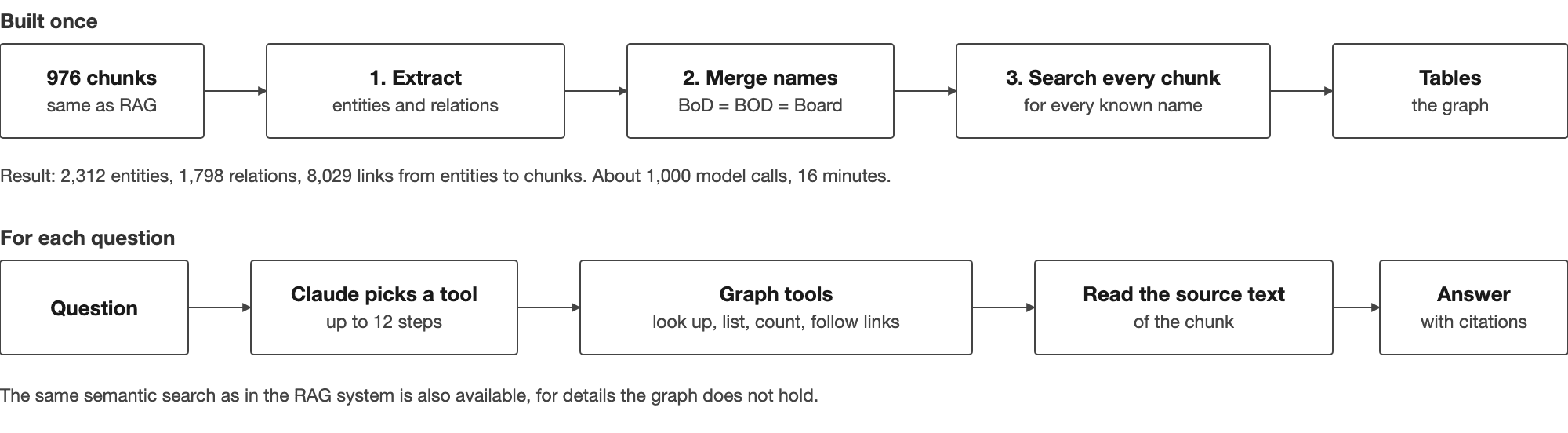
It starts from the same 976 chunks. The difference is all the work that happens before anyone asks anything, and it comes in four steps.
Each chunk gets sent to Claude Sonnet 5 with a prompt asking what entities and relations are in the text, and it comes back as JSON. Everything it hands back comes with the sentence it was taken from. We wanted that part. Otherwise you're taking the model's word for it, and with policy documents we'd rather open the file and read the line ourselves. Nine entity types, so roles, departments, benefits, tools, situations, actions and a couple more. Ten relation types for how they join up, approves being the obvious one, then escalates to, requires, and the rest. There are a handful of worked examples sitting in the prompt. We made those up ourselves rather than pulling them out of the documents, so the model wasn't being pointed at the answers to our own test questions. The script runs against a model endpoint in the Databricks workspace. About 1,000 calls, 16 minutes. Raw responses get dumped to a file so the steps after it can be rerun without paying for the extraction twice.
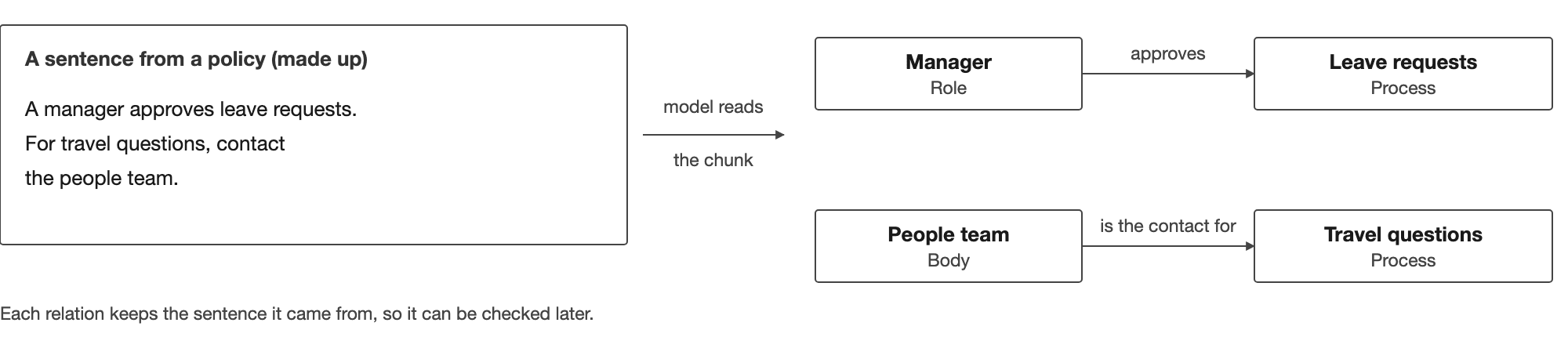
You might spot the same thing referred to under different names, a case in point being "Board of Directors", "BoD" and "BOD" all referring to essentially the same thing. So to bring some order to things, we apply pretty basic text rules to normalise names, meaning we look for any variations in case, punctuation and common abbreviations. If we've still got variations left after doing that, we then ask the model to group up any remaining synonyms. This adds another 26 model calls to the mix, but the results are cached so we can repeat this step if needed without too much of a hiccup.
There's also the issue that sometimes a model will plod through a chunk and, for whatever reason, miss a mention. So on top of running the extraction call through each chunk, we also do a separate sweep of all 976 chunks to see if we can find every known entity name and alias. Anything we turn up gets recorded, giving us a full map of which entities show up in which chunks, regardless of whether the extraction call even spotted them.
The results go into four Delta tables: nodes, edges, mentions and the raw extractions. The graph ends up with 2,312 entities, 1,798 relations and 8,029 links joining entities to the chunks they turn up in.
The answering agent is the same Claude Sonnet 5 with the same 12-step limit, but now it gets a set of graph tools on top of search. A tool here is just a small lookup the model is allowed to run for itself, and it decides which ones to use and in what order.
| Tool | What it does |
|---|---|
| Find entity | Look up an entity by name or alias |
| Documents mentioning | List the documents that mention an entity |
| Documents mentioning all | List the documents that mention every entity in a given set |
| Count documents | Return how many documents mention an entity |
| Get neighbors | Follow the relations of an entity |
| Get chunks | Read the original text of a chunk |
The semantic search from the RAG system is still sitting there too, for the details the graph doesn't hold.
We could have somehow pieced this together using a vector database, a graph store, a model API and a load of glue code. On Databricks though, most of that stuff was already in place.
Our documents are stored in a Volume, and they get broken down into chunks and stored in a Delta table. We've also got the graph stored as Delta tables, and the agent just reads everything with good old plain SQL, and it all falls under the same access rules. The Vector Search component was pointed at the chunk table, and all it's doing is handling the embeddings and keeping the index up to date, so we never actually ended up needing a vector database of our own. For the answering and extraction bits, Claude and GPT-5.5 for the judging, we just called them through the same Databricks workspace, pay-per-token, without having to worry about separate keys or servers. And changing a model? Just a case of changing a name in the config.
Since our graph is all stored in tables, we were able to slap a Genie chat interface on top of it with a pretty short setup script, and now people who can't write code can just ask it questions in plain English.
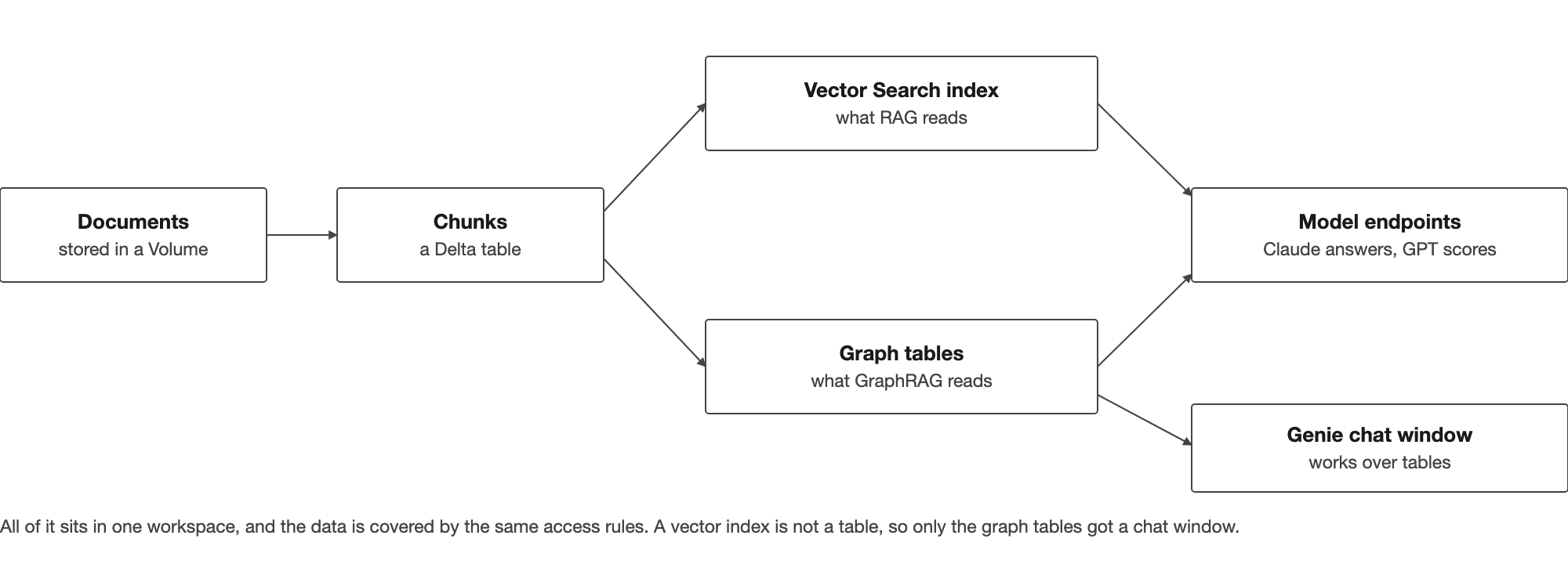
None of this is required, mind you. A hosted vector database, a Postgres table for the graph and any model provider at all would do the same job. You'd just have more pieces to wire together and the access rules would be your problem rather than the platform's. The results below come from the design, not from where it happens to be running.
The test took more effort than either system did.
We wrote 38 questions across five groups. Each one has an answer key, which is a list of the specific facts a correct answer has to contain, 187 of them in total. The keys for the list and count questions came from plain text searches of the documents, so we knew the real answers rather than guessing at them.
| Question group | What it asks | A made-up example in the same style | Questions | Facts |
|---|---|---|---|---|
| Single document | The answer sits in one place | What is the approval limit for a team lunch? | 5 | 13 |
| Several documents | Facts from two to five documents | Who approves a trip, and which form is used? | 11 | 48 |
| List them all | Every document that mentions something | Which documents mention the finance team? | 9 | 70 |
| Count or compare | A number or a ranking over all documents | Which team is named in more documents, finance or IT, and how many each? | 7 | 18 |
| A role across policies | What a role or team does across the documents | What does a manager have to approve, and where is each rule written? | 6 | 38 |
The marking is done by a separate model from a different family than the one writing the answers, GPT-5.5, which checks each answer against its key. A question's score is simply the share of expected facts the answer actually managed to find. Using a different family matters here, since a model marking its own homework tends to be generous about it.
Both systems got the same documents, the same chunks, the same answering model and the same 12-step limit. The only thing that differs between them is how they go looking for information.
25 of the questions were written while we were still building, and the other 13 came afterwards once both systems were done. Those 13 were never used to adjust anything, and we never added a rule or an alias to the graph because of something a test question wanted. Every system ran twice on every question.
Figure 5 has the scores by question group, averaged across the two runs.
| Measure | RAG | GraphRAG |
|---|---|---|
| All 38 questions, average of two runs | 57% | 90% |
| Run 1 and run 2 | 54%, 59% | 89%, 92% |
| 13 held-out questions | 51% | 87% |
| Single-document questions | 100% | 100% |
| List them all | 39% | 97% |
| Count or compare | 25% | 89% |
| A role across policies | 58% | 79% |
| Tool calls per answer | 5.5 | 3.3 |
| Time per answer | 32 s | 22 s |
Single-document questions came out level, so RAG clearly isn't broken. The gap only opens up when a question needs every match rather than the best few, and the list and count questions are where it opens widest. GraphRAG also got there with fewer tool calls and in less time, mostly because one lookup does the job of several rounds of searching. Across the 38 it scored higher on 21, lower on none, and level on 17.
Here's the CEO question again, for both. RAG's first run named two of the seven documents, and its second run managed one.
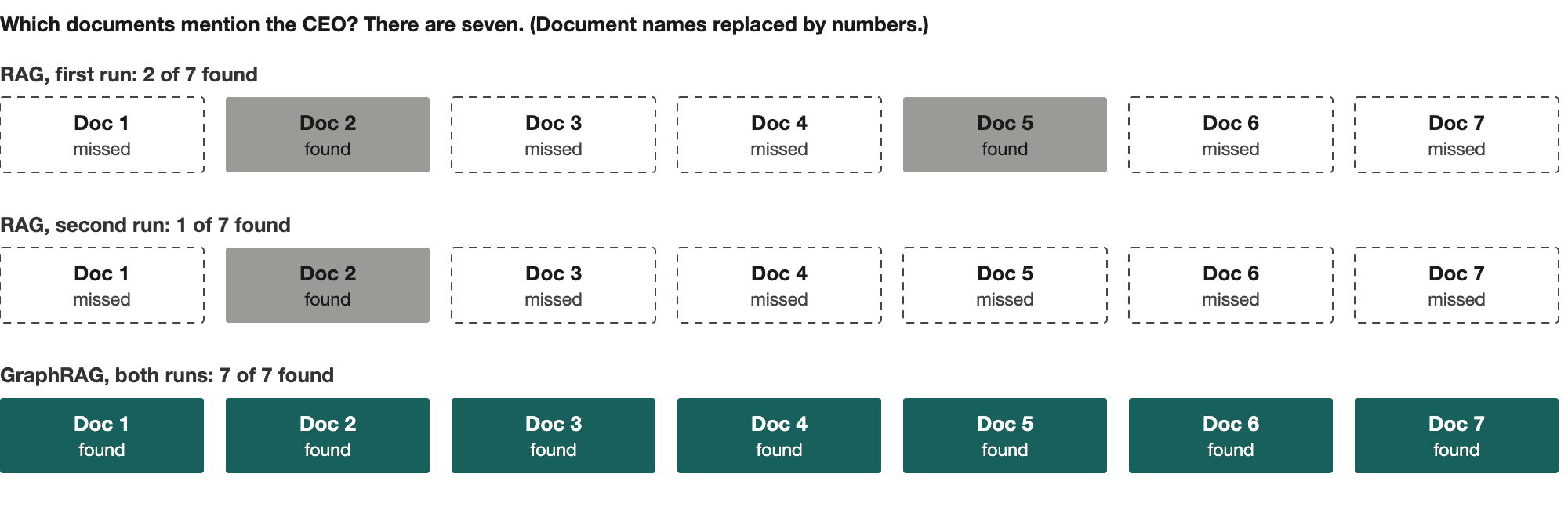
The weakest showing was the role-across-policies group, 58% up to 79%. Those questions want small details pulled from a lot of different places, and the graph still dropped a few. A detail only makes it into the graph if the extraction step turned it into a relation, and some of them simply never did.
Board question
One of the questions asked how many documents mention the board. The literal answer in our key was 8. RAG said 3 in one run. The graph said 9, because name resolution had decided that "the company's board" in one document was the same body. Which is arguably right, and our key was being too literal about it. It does show that merging names is a judgment call, and the graph ends up carrying whatever judgment you put into it.
The costs here are small, predictable, and mostly in your hands.
Start with the search side. A Vector Search endpoint is billed by the hour while it exists, about $0.28 at list price, so roughly $6.70 for a full day (Source: Databricks AI Search Pricing). It only costs while it's up. We deleted ours between test sessions and brought it back when we needed it, so we were never paying for it to sit idle. For a collection this small you could also run the index yourself, or keep it in a Postgres table you already have, for next to nothing. We used the managed endpoint because it came with the workspace.
The graph is a one-time build, not a running cost. Extraction took about 1,000 model calls and 16 minutes on pay-per-token models, and there's no server left running afterwards. When a document changes, only its own chunks go back through extraction and the names get merged again, so keeping the graph current means redoing the documents that changed, not the whole set.
It also gets better value as the collection grows. The endpoint is billed by the hour and not by the document, up to what one endpoint can hold, so that charge is spread over more and more content. And an answer that looks complete but misses most of the matches does more damage with every document nobody can check by hand. We haven't run this at that scale, so that part is our reasoning and not a result. The thing that does grow with size is extraction, roughly one model call per chunk, so that's the number to work out first, along with how often your documents change.
RAG is a good place to start, and for plenty of questions it's all you'll need. If your people mostly ask what a document says, it will do the job, and it's quick to set up.
Things change when the questions need everything. Which documents mention this, how many of them do, what does this team do across all of it. Those were the questions where plain RAG gave us answers that looked complete and weren't, and where GraphRAG went from 39% to 97% on the list questions and from 25% to 89% on counting and comparing. If that sounds like what your people ask, then in our test the graph was worth building.
...Loading Related Blogs
Trusted by top platforms for our transformative solutions and exceptional results: