
 Add as preferred on Google

How a Repository Health Dashboard Helped Open edX Patch certifi in 48 HoursRead More

Every Salesforce admin who's set up field history tracking hits the same wall: 20 tracked fields per object, full stop. That's fine for a simple object, but rarely enough for Case, Account, or anything central to a regulated workflow. The usual workarounds, whether rationing your 20 slots or paying per user for a third-party app, never feel right when all you want is full audit coverage without a new line item in the budget.
We ran into this often enough supporting Salesforce customers that we built our own answer: Histora, a free AppExchange app that extends field history tracking well past the platform ceiling, no Apex required to configure. Here's how we built it, and what a real setup on the Case object looks like.
Three issues stack up once an org outgrows native tracking. There's the hard cap first: 20 fields per object, and only about 18 months of guaranteed retention unless you pay extra for Field Audit Trail. Then there's fragmentation. Even inside that 20-field budget, you're hunting across different pages just to see which fields are tracked, whether tracking is even turned on, and how long records stick around. Third, cost: most AppExchange alternatives charge per user, per month, which is a hard sell to finance when the ask is simply "track more fields, safely."
Any real fix needed to solve all three at once.
We didn't want to build a one-off fix, so Histora became a reusable framework instead. A few decisions drove that: configuration had to live in one guided wizard instead of being spread across screens, the processing engine needed to hold up no matter how much data came through, and retention had to be something you set per object, right down to never deleting history at all if that's what your compliance team wants.
Architecturally, Histora has four moving parts.
The history object. For every parent object we extend tracking on, we create a dedicated child object (Case_Custom_History, in our reference setup) storing a lookup back to the parent record, the field's API name and data type, the user who made the change, and typed old/new value columns for every data type we support: checkbox, date, date/time, lookup, number, and text.
Normalizing values. Picture one history row logging a checkbox flip, and the next one logging a currency change on a totally different record. We resolve both into one readable string using a formula field that branches on the recorded data type:
IF(
 ISPICKVAL(Field_Data_Type__c, "BOOLEAN"),
 IF(New_Value_Checkbox__c, "TRUE", "FALSE"),
 IF(
   ISPICKVAL(Field_Data_Type__c, "DATE"),
   TEXT(New_Value_Date__c),
   IF(
     ISPICKVAL(Field_Data_Type__c, "DATETIME"),
     TEXT(New_Value_Date_Time__c),
     IF(
       ISPICKVAL(Field_Data_Type__c, "TEXT"),
       New_Value_Text_Display__c,
       IF(
         ISPICKVAL(Field_Data_Type__c, "REFERENCE"),
         New_Value_Lookup__c,
         TEXT(New_Value_Number__c)
       )
     )
   )
 )
)
Flip that same logic around for the Old_Value_* fields and you get Old_Value_Display__c. That's the trick that lets a single history table cover every data type Case has, without needing a separate set of columns for each one. Whoever's auditing the log just sees one clean "old value to new value" string every time, regardless of what kind of field actually changed.
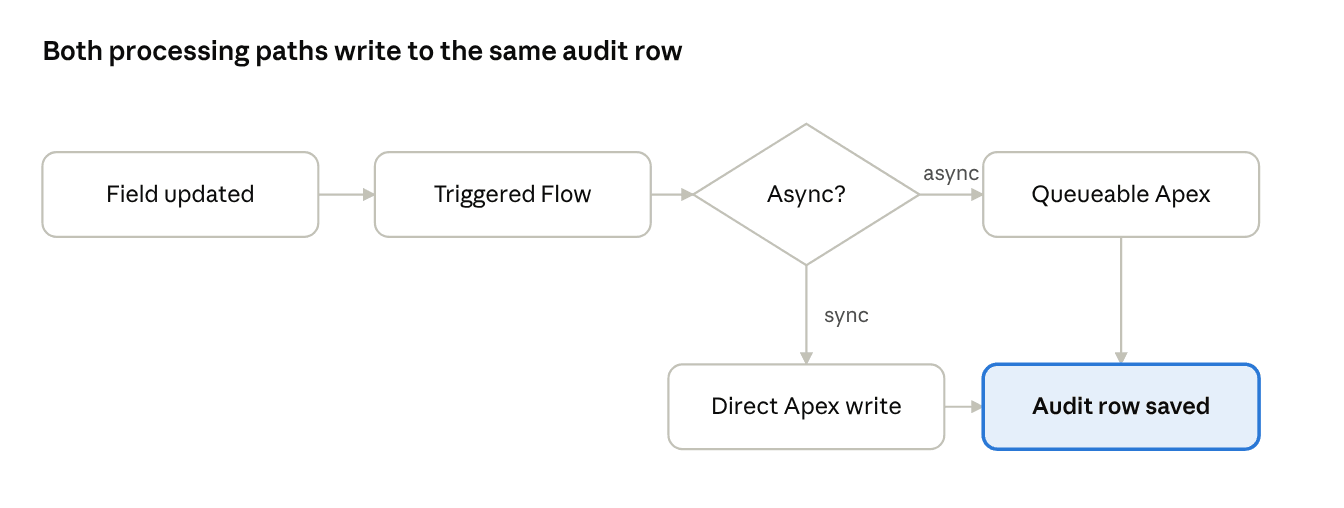
Capturing the change. A Record-Triggered Flow on the parent object fires on create and update, calls an invocable Apex action, and passes it the new and prior record state. That action diffs the tracked fields and writes the history rows.
Choosing a processing model. This is where the volume problem gets solved. Each setup can run Synchronous, for low-volume objects, or Asynchronous, which hands the diff-and-write work to a Queueable Apex job after the transaction commits. For an object like Case, we recommend Asynchronous, since it keeps tracking off the critical save path entirely. Whichever path an object uses, the Flow and its Apex action converge on the same typed history row, so the audit trail reads identically either way.
There's also a scheduled job, the Retention Engine, that purges, archives, or holds onto rows based on whatever Retention Period you've set for that object. And if someone accidentally deletes that job from Setup? You don't have to rebuild it by hand. Just open any existing setup record and hit Save, and the app notices the gap and puts itself back together.
A support organization needed audit visibility into several Case fields, including Origin, Reason, Type, Subject, and various SLA-relevant custom fields, that together exceeded the native 20-field limit. The setup took three steps: select Case as the parent object; point it at Case_Custom_History with Processing Type set to Asynchronous and Retention Period set to Never Delete, since this was being treated as a compliance record; then pull Case's schema into a field grid and check the fields to track.
From there, rollout was a page-layout exercise rather than development: a read-only permission set for agents, an admin permission set for whoever manages the setup, and Salesforce's Record History Table component dropped onto the Case page layout with "Include Standard History" enabled, merging native and extended history into one timeline.
The difference, concretely:
Dimension | Native tracking | Histora |
|---|---|---|
Fields per object | Up to 20 | Up to 45 |
Retention | ~18 months, or paid add-on | Configurable, including Never Delete |
Configuration | Scattered settings pages | One 3-step wizard |
Processing | Platform-managed | Sync or async, per object |
Cost | Add-on required past 20 fields | Free |
Default to asynchronous on anything busy: synchronous tracking is simple, but on a high-traffic object it adds latency and lock contention exactly where you can least afford it. Treat retention as a compliance decision, not a storage one; Never Delete should be a deliberate choice made with the business owner, not a default picked to save space. And build recovery into the product itself rather than a runbook: "save the record" beats "open Developer Console" every time someone has to explain what went wrong.
Native field history tracking is a fine starting point, but nobody designed it to be the last word on auditability for every object in every org. The 20-field ceiling is real. So is the scattered configuration, and so is the price tag on most alternatives. None of that is a reason to leave holes in your audit trail, though. If there's one thing building Histora taught us, it's that the technical fix is only half the job. The other half is making it something an admin can switch on from a wizard, trust to fix itself when something breaks, and never have to fight for budget to keep.
...Loading Related Blogs
Trusted by top platforms for our transformative solutions and exceptional results: